17 Best GPS Navigation Apps for iPhone & Android in 2026 (Q4 Update)
Navigation apps! Mapping apps! Between the Apple App store, the Google Play store, and desktop software, my most current count has 188 of these GPS-centric apps floating around.
And you're probably here because you searched some variant of "What is the best navigation app?"
Good question. Most of us default to whatever came pre-installed on our phone, but the best GPS app for your situation isn't always the most obvious one.
What "best" means depends on what you're actually doing:
- Convenience: Get where you're going faster and burn less gas doing it - a huge deal in this day and age (unfortunately)
- Reliability & Accuracy: A good GPS app finds the smartest or most optimized route, not just point A to B.
- Availability: Can you get it on your phone's app store? Does it work where you live? And can you try it out for free?
On top of that, the best navigation apps should offer unique, useful features - traffic and weather alerts, multiple stops, location sharing or check-ins, etc.
I went through the field - all 188 on my list - and narrowed it down to the 17 best navigation apps for iPhone and Android in 2026, sorted by what you're actually trying to do: (1) daily commuting, (2) outside sales, (3) delivery routes, (4) road trips, or (5) outdoor adventures.
Best Navigation Apps for Daily Routing
For most people, "best navigation app" really just means "best app for my daily commute".
You don't need route optimization for 50 stops or offline trail maps. You need something simple, fast, and accurate.
That's where Apple Maps, Google Maps, and Waze come in. All three are free, all three are reliable, and picking between them mostly comes down to what ecosystem you're in and how much you like real-time crowd-sourced traffic data. Here's how they stack up.
Apple Maps

Price: Free
Main benefits: Integration with Apple devices, privacy, simple design
Get it: iOS of course, but as of 2025, there's also a web version at maps.apple.com that works on Android and Windows browsers (though this version is missing transit directions, 3D buildings, or saved places)
Apple Maps is not the "afterthought" it used to be. Apple's a legitimate competitor to Google Maps now, not just the default on your iPhone. One place it really stands apart: privacy. Apple doesn't build the ad-driven profile Google does, which matters if that's a priority for you.
Design-wise, Apple leans into "less is more", with fewer on-screen elements than Google or Waze. The map itself has a more photographic, textured look rather than the flat, schematic style you get elsewhere, and the Look Around feature (Apple's answer to Street View) gives you 360-degree panoramic views plus a cool 3D flyover mode.
If you're already using an iPhone, Apple Watch, or a car with CarPlay, Apple Maps' native Siri integration makes it the easy, low-friction choice.
Check out our guide that shows you how to create routes with multiple stops using Apple Maps!
Google Maps

Price: Free
Main benefits: User-friendly, reliably updated, Google ecosystem
Capterra Rating: 4.7
Get it: Android | iOS
You already know Google Maps. It's the default for a good chunk of people - it's free, it works on basically every device, and it handles walking, driving, biking, transit, and flying directions all in one app.
What's easy to overlook is how much it's grown past "just navigation." Real-time traffic, Immersive View (a useful 3D preview of an area before you arrive), an AI-powered Explore tab, and EV charging station info with live availability and charging speeds are all built in now.
Where it falls short: Google's route planner has real limitations if you're managing stops for work (outside sales, deliveries, that kind of thing). It'll find the best path between two points, but it won't optimize a full multi-stop route, and you're capped at 10 stops total.
Bottom line: if you're a small business without complex routing needs, Google Maps covers the basics well. If you're managing a real route for work, you'll hit its ceiling fast.
If you're a field salesperson, you can take advantage of an app that is designed specifically for field salespeople!
Waze

Price: Free
Main benefits: Real-time data, speed control, parking notifications
Waze runs on a different idea than the other two - actual drivers reporting what's happening in real time, instead of one company mapping the world for you. Traffic, closures, accidents, speed traps - it all comes from people driving past it right now, which is why it feels different than Google Maps (despite being owned by Google).
A few nice touches: you can schedule a drive and Waze will nudge you when it's time to leave, and every so often the app rolls out celebrity voice packs - think Morgan Freeman or Arnold Schwarzenegger - for turn-by-turn narration.
The catch: Waze's route planner, like Google Maps, doesn't do unlimited or optimized multi-stop routes. Add a stop, build a new route - fine for one drive, a hassle for a full day of deliveries or sales visits.
Best Navigation Apps for Outside Sales
Badger Maps

Price: Business plan from $58/month; Enterprise from $95/month
Main benefits: Route optimization for 100+ stops, route planning, scheduling, keeping track of appointments
G2 Rating: 4.7
For sales reps who spend a lot of time in the field, route planning is a crucial aspect of their job. Without it, you will end up spending more time in your car than with your customers.
The modern solution? Automate this process with a route planning tool such as Badger Maps - whether you're a solo rep or managing a sales team of hundreds.
Badger Maps is the best field sales software as it allows you to automatically plan, route, and maximize your time in the field, cutting down driving time by 20%. It helps sales teams save time on their daily planning, maintain better relationships with customers, and be more productive.
Take your long customer list and automatically turn it into a drivable, optimized route with Badger Maps. By optimizing your day, something you can’t do with Google Maps, you will save money on gas and meet with more customers than you normally would.

With features like lead generation, territory management, check-ins, and follow-up reminders, Badger Maps not only enables efficient routing and navigation for field salespeople, but it streamlines every single aspect of a field salesperson’s job.
The colorizing and filtering tools are great for planning your days. You can visualize your top accounts with colored pins, mass update information, see who’s generating the most revenue, and much more. Filters are fully customizable so you can visualize accounts based on priority, type, next step, or any other field you find useful.
For larger teams, Badger's Territory Management Suite takes this further - tools like Badger Align automatically build balanced territories that cut down overlap and drive time, while Badger Insights and Badger Scoreboard give managers real-time visibility into how the whole team is performing, not just one rep's route.
Sales teams have reported that they sell 25% more and drive 20% less when using Badger Maps, in fact, the average team of 10 reps sells $936k more the year they start using the app.

"After getting Badger Maps, weekly meetings per rep jumped from 12 to 20. This led to a 22% increase in annual revenue."
Brad Moxley
Business Development Manager, Cutter & Buck
Using Badger Maps also means you can mobilize your sales CRM software, giving you instant access to important customer information as you work your territory. You can easily sync and leverage data in your CRM, all from your mobile device.
You can enable a two-way, real-time native integration with the most popular CRMs such as HubSpot, Salesforce, Zoho, Microsoft Dynamics, NetSuite, Insightly, and many more.
Badger Maps is also built to handle enterprise-scale rollouts securely, with SSO, HIPAA compliance, GDPR compliance, and AWS-certified infrastructure - so IT and security teams get the same confidence that sales teams get from the routing itself.
Additionally, field sales teams increase their CRM usage by 50% when using Badger Maps.
If you’re looking to drive more efficiently and optimize the time you spend on the road, the best GPS navigation app is Badger Maps.
On average, sales teams using Badger Maps save 8 hours a week, drive 20% less, and sell 22% more.
Discover the value of Badger Maps by trying it out yourself. Start a free trial or schedule a demo now!
Badger Maps, the Highest Ranked App in the B2B Sales Mapping Apps Category
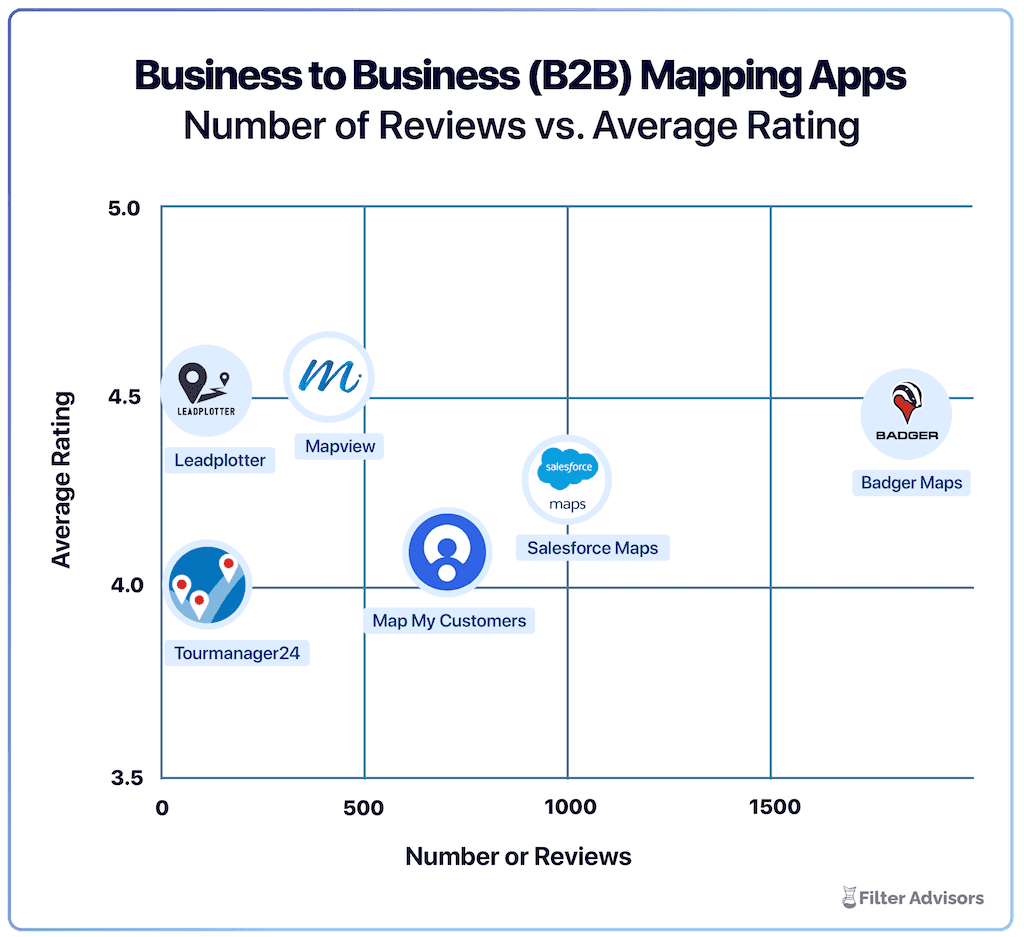
Badger is the highest ranked sales mapping and routing app, according to an industry wide analysis done by Filter Advisors, a technology consulting firm. Read more here.
Sales Rabbit

Main Benefits: Lead management, gamification
Capterra Rating: 4.2
Pricing: Team - $59/mo, Pro - $75/mo
SalesRabbit is built specifically for door-to-door (D2D) sales teams. It handles the parts of the job that go beyond routing - digital lead tracking, real-time team communication, e-contracts, and analytics - all in one place.
What sets it apart is real-time performance tracking: managers can see team activity and individual rep performance as it happens, not after the fact. It also leans into gamification - leaderboards, badges, contests - to keep reps motivated in a job that runs on energy and repetition.
If your team is doing door-knocking, in-home sales, or B2C canvassing, SalesRabbit's built specifically for that world - it's a specialized tool, not a general navigation app with sales features bolted on.
Best Navigation Apps for Delivery Services
HERE WeGo

Price: Free
Main benefits: Available offline, real-time traffic information
HERE WeGo also supports multi-stop routes now, and like most apps on this list, it compares routes to find the fastest one. Where it stands apart: offline maps for over 100 countries, so you're covered even if you lose signal mid-route, and traffic and parking data you can check before you even leave - useful if you're trying to time a pickup or delivery around when parking near a stop is actually going to be available.
One thing that sets HERE apart from most consumer navigation apps: it's built and maintained with backing from major automakers (BMW, Audi, and Mercedes-Benz among them), so map updates tend to integrate especially well with built-in vehicle navigation systems.
Spoke (formerly Circuit)
Price: Free tier (caps at 10 stops), Standard (unlimited stops) - $20/mo,
Main benefits: Works with your existing GPS app, built for couriers
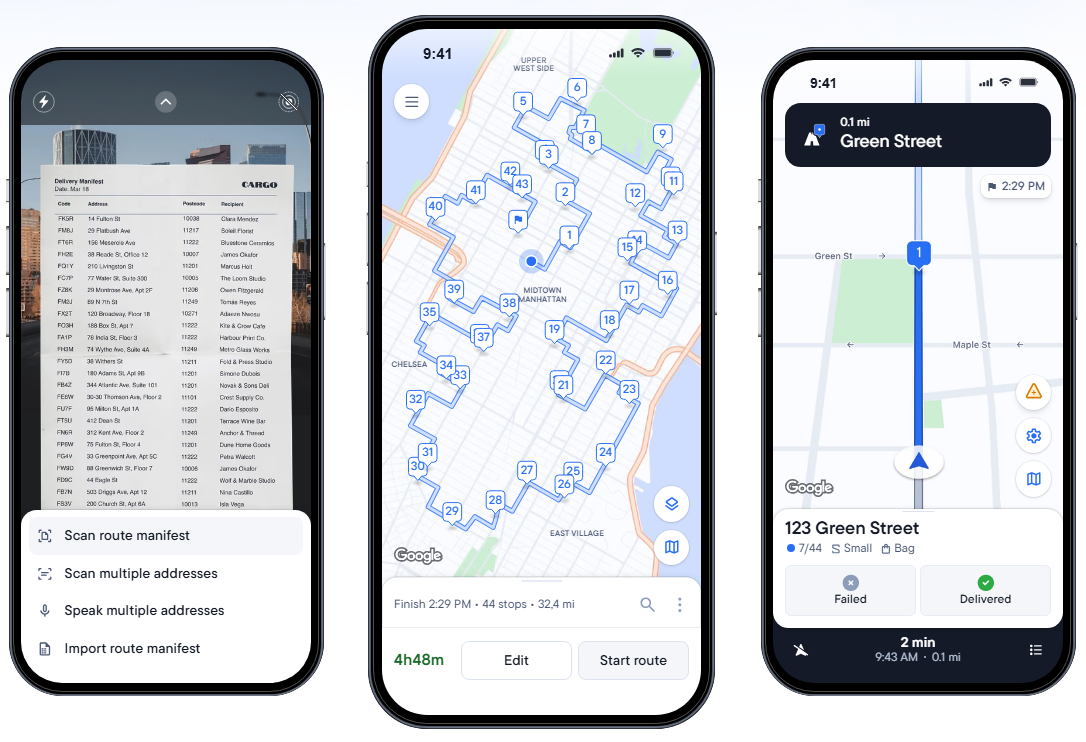
Spoke Route Planner - formerly Circuit Route Planner, rebranded in 2026 - works a little differently than the other apps here. It's not exactly a standalone map - it's a route optimizer that sits on top of Waze, Google Maps, or Apple Maps. You dump in your stops, it figures out the fastest order to hit them in, and then it hands off turn-by-turn directions to whichever GPS app you already use.
Delivery drivers get real route optimization for a full day's worth of stops - something none of the big three consumer apps do well - without giving up the map you already trust for actual driving. It also handles the small stuff that adds up over a shift: time windows per stop, rest breaks, instant ETAs, and package details so you're not hunting through a stack for the right box.
CoPilot GPS

Price: Starting at $14.99 per year
Main benefits: Customizable for your vehicle type, available offline
CoPilot GPS keeps things practical: a traffic status bar for real-time updates, lane indicator arrows, and highway signposts so lane changes don't catch you off guard.
What makes it a solid fit for delivery work is vehicle-specific routing - car, RV, or truck - so it factors in things like road width and clearance that a generic app would ignore. You also get a choice of alternate routes with time and distance laid out for each, plus a solid address/gas station/parking search that pulls in Yelp results without leaving the app.
The core navigation is free, but voice-guided offline navigation, full route planning, traffic data, and worldwide maps all sit behind a paid tier, with pricing depending on which features and vehicle type you need.

If the button above doesn't work, please update your cookies settings here.
Best Navigation Apps for Road Trips
Roadtrippers

Price: Free
Main benefits: Instant fuel cost estimation, explore based on categories
With more than 38 million trips planned and more than 42 billion miles covered, this is one of the best navigation apps when it comes to planning a road trip.
Roadtrippers is great for exploring new places, thanks to an intuitive and engaging planning process. They have a collection of more than 300 interesting and extraordinary places that you can visit to take your trip to the next level.
Plan a trip from A to B and find places to explore within a set distance from your route. Roadtrippers also suggests places to stay along the route, with reviews and photos to help you find the perfect resting spot. You can find places to camp, sights and attractions, hotels, and cool activities to do directly from the app. You can sync with your favorite GPS app (like Google Maps) for seamless navigation.
Roadtrippers allows you to map your route with up to 3 stops free of charge. After that, there's an option to upgrade to Roadtrippers Basic, Pro, or Premium, all of which come at varying costs. Roadtrippers Premium costs $59.99/yr, coming with offline maps, live traffic alerts, and 150 stops per trip..
| PROS | CONS |
|---|---|
| Discover places you're not familiar with | Free and basic options have ads |
| Offline maps | Navigation can be unreliable |
| Free version is hard to use |
MapQuest

Price: Free
Main benefits: Find the best gas prices, create custom maps
MapQuest is the original mapping app having first launched way back in 1996. They set the standard for mapping tools and have stuck close to their original concept since then. With an interactive map where you can discover hotels, gas stations, grocery stores, and more, Mapquest offers real-time traffic data including traffic slowdowns, incidents, and webcams.
With this free GPS app, you can add up to 26 stops to find the best route to save you time and gas money. What makes this GPS app fun to use for road trips is that you can create custom maps to easily share with your friends and family.
Keep in mind that this app is not available offline, so you’ll need access to an internet connection to be able to use it. MapQuest is also quite outdated and lacks modern features such as lead generation, customization, or live-traffic updates.
| PROS | CONS |
|---|---|
| Simple mapping capabilities for users without complex mapping needs | Doesn't provide alternative routes when stuck in traffic |
| Ease-of-use | You have to restart a trip if you want to add a stop |
inRoute Route Planner

Price: Free, inRoute Pro - $4.99/mo, inRoute Pro for Families - $6.99/mo
Main benefits: Weather charts, can exports maps to other apps
Get it: iOS
With the ability to add addresses as either pins, starting point, waypoint, or destination, InRoute is one of the best choices out there for creating multiple multi-stop routes at once.
This app offers unique features such as weather alerts, elevation, and curviness.
With the free option, you can create routes with up to 8 stops. For routes with up to 150 stops, turn-by-turn navigation, and weather reports, you will have to upgrade to the paid version.
| PROS | CONS |
|---|---|
| Weather forecasts and road conditions | Limited to Apple devices |
| Sync and share routes between devices | Drag and drop pins feature can be cumbersome |
Sygic GPS Navigation & Offline Maps

Price: Free
Main benefits: Several view options
With an option for top-down 2D view or a smart-looking 3D display and accurate live-traffic alerts, this navigation app has all it needs to be a great option for road trips and, arguably, within a better-looking interface compared to other GPS apps for road trips.
Driving instructions are accurate and timely. If you miss a turn, it’s normally quick to re-route.
Some innovative and cool features that make this app stand out are speed camera location information, photo-navigation (to navigate to places you’ve taken pictures of), a heads-up display (to limit the number of distractions while driving), a dashcam feature (that records the view out your windshield), and celebrity voices - including Homer Simpson and Snoop Dogg!
With their electric vehicle mode, users can locate nearby charging stations, check their availability, and even pay for the service directly in the app.
Although they do offer a free version, most of the key features such as real-time traffic, speed limits alerts, and voice-guided navigation will require a premium subscription.
| PROS | CONS |
|---|---|
| Innovative features | Persistent ads |
| Offline maps with 3D buildings | App is unreliable |

Best Navigation Apps for Outdoor Sports
Komoot

Price: Free region, Single Region - $ 3.99, Region Bundle - $ 8.99, World Pack - $29.99, Premium - $59.99/year
Main benefits: Offline mapping and navigation, great for unsurfaced paths
Komoot is a great GPS map option for those that practice sports like biking, hiking, and running.
Bike lovers can choose to use a road bike, touring bike, or mountain bike, and Komoot will find the most appropriate route (bigger roads for road bikes, unsurfaced sections for mountain bikes, etc.).
What makes this sports GPS app different from any other is that users can add highlights and POIs. That means that if you want to explore an unsurfaced area, you can choose some of the highlights added by other users and ask Komoot to create a route that includes them.
When it comes to pricing, Komoot offers one single region for free, which is good to try out the app and see if you like it. Then, you can either buy regions at different pricing points.
| PROS | CONS |
|---|---|
| Great compatibility with smartwatches | Too many ads |
| Easy-to-use | Satellite connection issues |
Alltrails

Price: Free version, AllTrails+ - $35.99/year
Main benefits: User-friendly, activity tracking, discover new hiking routes
With road, satellite, and topographic map views, Alltrails helps you find your perfect hike, bike ride, or trail run.
With 400k+ hand-curated and verified trail maps contributed by a community of sports enthusiasts, you can find the best route for you with filters like length, rating, and difficulty level. You can also look for dog or kid-friendly trails.
Although it requires an internet connection, with an AllTrail+ subscription ($35.99/year), you can download maps for offline navigation, along with other extra features.
| PROS | CONS |
|---|---|
| Offline maps | App updates have removed some favorite user features |
| Track your distance | App funcionality can be inconsistent |
Polaris GPS Navigation

Price: Free
Main benefits: Built-in compass tool, ability to record your tracks
Get it: Android
Used mostly as an off-road hiking, nautical, and trail GPS app, Polaris GPS Navigation offers an incredible amount of features that can maximize your outdoors experience in safety.
If you’re a first-time user of a GPS app for outdoor sports, Polaris might not be the best choice because of a steep learning curve and because all the features on the main screen can be overwhelming.
However, if you know how to use a compass for navigation, and you find latitude, longitude, altitude, and other information useful, or you value features such as sunset/sunrise tracking features and satellites tracker, then this GPS app for android is definitely the best choice for you.
Just keep in mind that most of these features require an internet connection.
| PROS | CONS |
|---|---|
| Highly-accurate | A lot of ads in free version |
| Functions well for off-road driving | Only available on Android |
Spyglass

Price: $5.99
Main benefits: Accurate location tracking, augmented reality display
With an incredible number of tracking features including a mil-spec compass, gyrocompass, real-time viewfinder, tactical GPS, speedometer, altimeter, and a sextant with rangefinder, Spyglass uses your phone’s camera and hardware sensors to calibrate your exact positional information.
And that’s not all! With Spyglass, you can measure the distance between two different objects, and find your way using the location of the moon and stars.
Just like with Polaris, these and other features can be overwhelming if you’re a beginner.
However, Spyglass is the perfect iPhone GPS app for expert outdoor sportspeople.
| PROS | CONS |
|---|---|
| Offline maps | App is unreliable |
| Augmented Reality (AR) Compass | Complicated onboarding process |
Bonus: Best Navigation App for Public Transportation
Citymapper

Price: Free
Main benefits: Travel options based on time, cost, and energy
With the mission of “making cities usable”, Citymapper is the best navigation app to get to any destination by public transport.
Although its main focus is on buses and trains, you can use it to plan a journey by any means of transportation, unlike other similar apps.
The most useful feature is to see the status, destination, and time until your train or bus will arrive, along with other useful information.
The only downside is that it’s only available in major cities with lots of tourists and commuters.
However, you can vote for the next city to be added to their website.
Citymapper is definitely the best choice for commuters.
| PROS | CONS |
|---|---|
| Comprehensive information about your movement/destination | Connectivity issues |
| Reliable for commuters | GPS directions not always accurate |
Conclusion
Using a navigation app is already the norm for most people.
But because there are so many options out there, sometimes it’s easier to stick to the one you’ve always used without looking if there’s an option that is more suitable for your needs.
However, if you're looking to branch out and try a new tool, there are countless options out there for you to choose from.
Hopefully, this list has helped you find the best navigation app for your specific use case.
The best way to be 100% sure is to download a couple from the category you need. A lot of them even offer free trials where users can get an understanding of the app before committing to a subscription.
It depends on your specific needs. For general navigation, Google Maps is the most reliable and easy to use. However, there are apps that specialize in specific categories. For example, for field sales routes or field services, Badger Maps is the best all-in-one navigation app.
The best free app for navigation is Google Maps. However if you need a navigation app for outside sales or field services, Badger Maps is an app for field teams that connects with Google Maps to give you the best possible driving experience while you are visiting customers.
You can track a salesperson’s activity with Badger Maps. Its advanced reporting feature gives you information about your reps’ activity in the field. To track their GPS location at all times, you can use a system like Hubstaff.
Google Maps is a great navigation tool since it’s easy to use, reliable, and free. However, if you need to optimize more than 10 stops on a regular basis, you should consider looking into more specialized software like Badger Maps (for sales and field services). You can find more information on Google Maps’ limitations and alternatives here.
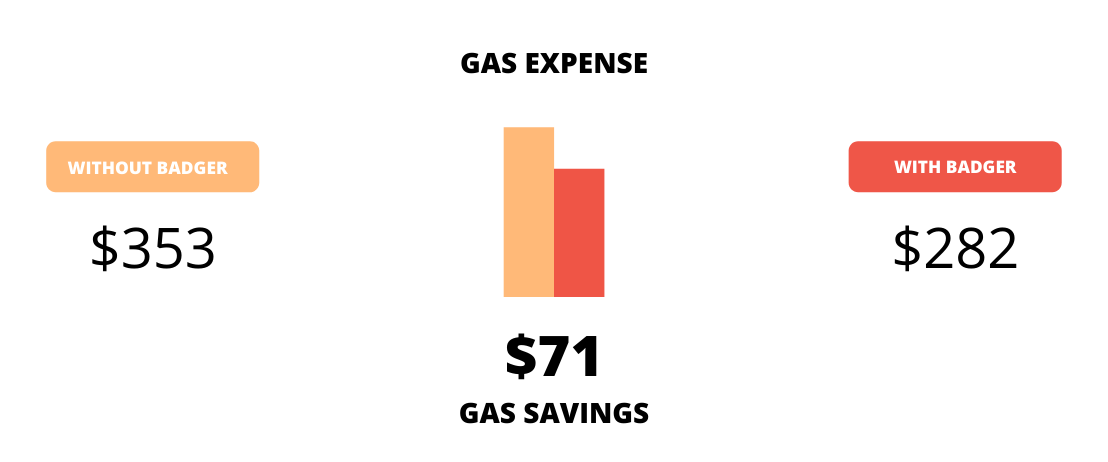
BADGER PAYS FOR ITSELF WITH GAS SAVINGS
Sales Reps using Badger sell at least 22% more and drive 20% fewer miles.
See the potential return on investment you can get by using Badger Maps with your field sales team.

The leading app for field teams
Badger Maps is a routing & mapping app that automates data collection and uplevels field team performance. From planning your day to managing your territories, Badger optimizes every aspect of the field sales process.
90-day money back guarantee
No set up fees.


Related
Looking for our logo?
Grab a Zip packed with our logo in PNG and EPS formats.