The Best Salesforce Maps Alternatives in 2026
Which Field Sales Tool Is Right For You?
If you're looking for a Salesforce Maps alternative, odds are you're in field sales, and odds are you already know Salesforce retired the standalone Maps mobile app in August 2026. (We broke down exactly what changed, and what to do about it, in this article.)
The app retirement has a lot of teams seeking alternatives or even reevaluating the whole platform, not just the app that just went away.
But the thing is, Salesforce Maps still makes for a compelling product: geo-intelligence layered natively on top of your existing Salesforce investment. For some enterprise organizations, it delivers on that promise - especially for desktop-based territory design and geographic analysis.
But if your primary need is mapping and routing, you've probably run into their now-retired routing app that crashed more than it worked. Or you may have encountered a total cost that kept climbing well past the sticker price, or possibly a setup process that required admin expertise and consulting support just to get started… but know you are not alone! These are some of the patterns that show up most consistently in Salesforce Maps reviews, and they're legitimate reasons to look elsewhere.
This guide covers the strongest Salesforce Maps alternatives, starting with the one we think makes the most sense for B2B field sales teams who need a tool that works in the field today.
The Best Salesforce Maps Alternatives for Field Sales Teams in 2026
What to Look for in a Salesforce Maps Alternative
Before switching, it's worth getting clear on what your team actually needs - because the right answer for a sales ops manager who primarily needs desktop territory visualization is very different from the right answer for a B2B field sales team working territories.
Mobile-first reliability: if your reps use the tool in the field on a phone, mobile performance isn't a nice-to-have - it's the product. Salesforce Maps retired its standalone mobile app in August 2026 after years of reviews describing constant crashes, battery drain, and required restarts. Check app store scores before you commit - they tell you what reps actually think, not what admins write on G2.
Time to value: how quickly can your team be productive? I bet you remember how much admin configuration, permission set setup, and support consultation it took to get Salesforce Maps up and running. Avoid that - the best alternatives get reps going the same day with a free trial and no technical overhead.
Territory management: the ability to design, visualize, and optimize territories - not just assign accounts - at the managers' leisure. The best platforms let managers model scenarios, balance workloads, and adjust alignments as the team grows.
Lead generation: for B2B field sales reps, the ability to find new prospects while already in an area - pulled from Google Places in real time, not from separately purchased 3rd party tools. Proactive in-field discovery is a feature that compounds over time.
Cost: Salesforce Maps starts at 75-150/user/month on top of your existing Salesforce license. Are you getting your desired ROI? Are you maximizing field productivity per dollar?
CRM independence: It may feel minor, but it's definitely worth thinking about - Salesforce Maps only works inside Salesforce. If you ever choose to migrate out of that ecosystem, you will lose more than you realize. A CRM-agnostic field sales tool that integrates like it's native is significantly lower risk. The best alternatives work with your CRM rather than requiring it.
1. Badger Maps - Best Overall Salesforce Maps Alternative for Field Sales Teams
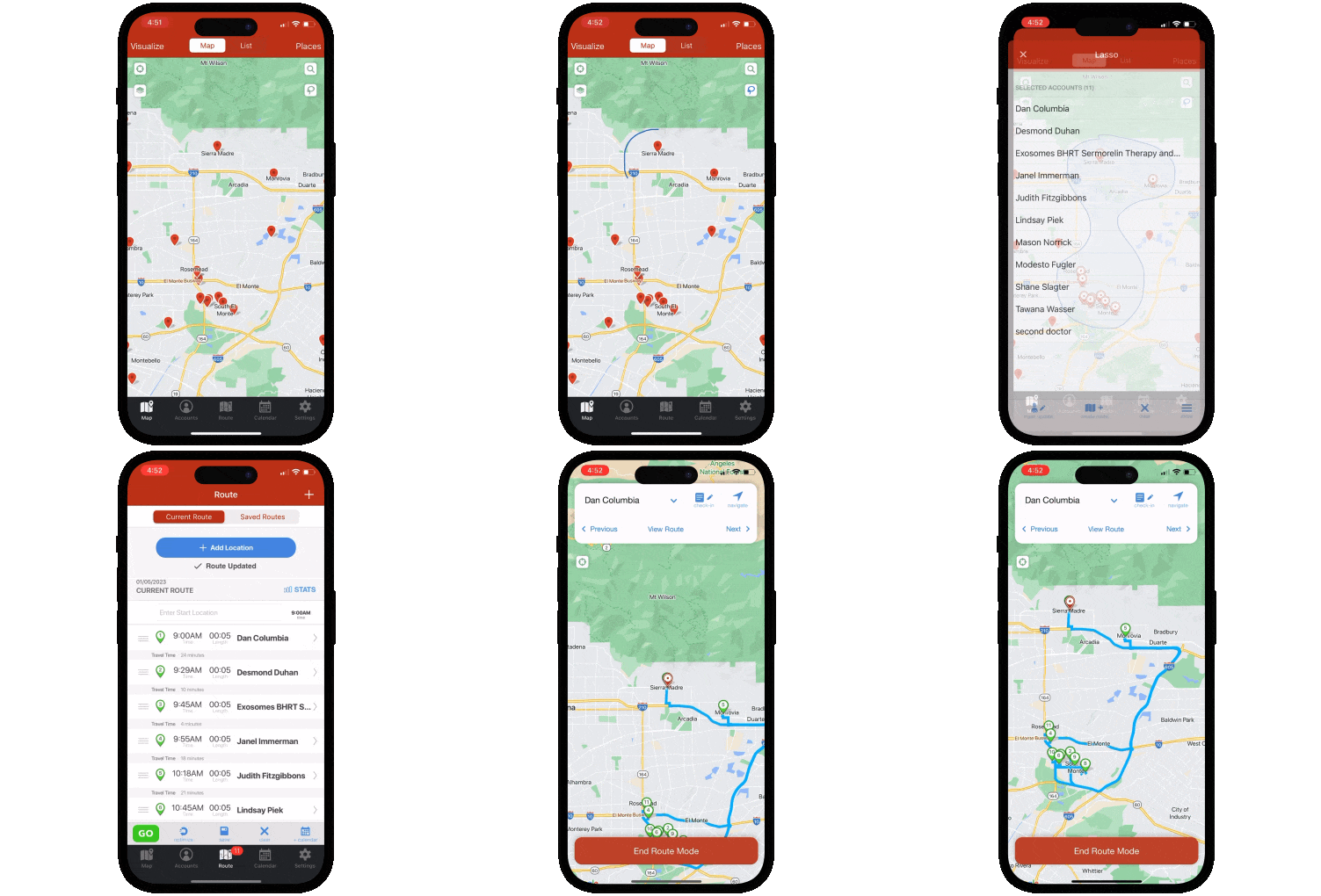
Founded in 2012, Badger Maps is the #1 field sales app for outside sales reps - and the most complete Salesforce Maps alternative for B2B field sales teams who need a tool that works in the field, not just on a desktop. Where Salesforce Maps retired its standalone mobile app in August 2026 after years of catastrophic app store scores, Badger Maps scores 4.5 on the App Store. And where Salesforce Maps requires a Salesforce license, a Maps add-on license, and admin configuration just to get started - Badger Maps connects to your existing Salesforce with two-way, real-time sync and gets reps productive the same day.
To illustrate: a medical device rep can use Badger Maps to map every hospital and clinic in their territory, filter by last visit date and priority, build an optimized multi-stop route around their highest-value accounts, discover new leads nearby with the Lead Generation feature pulled from Google Places, and sync every check-in automatically back to Salesforce - all from their phone before leaving the parking lot.
And remember, a streamlined mobile experience doesn’t just just help your reps perform, it drives adoption, increases leadership visibility and makes your CRM work harder for you, whether it's Salesforce or something more niche.
What it does well:
- Scores 4.5 on the App Store - built for the field, not just the desk
- Integrates natively with Salesforce, HubSpot, Microsoft Dynamics, Zoho, Netsuite, Pipedrive, and more - two-way, real-time, on all plans
- Optimizes multi-stop routes automatically with live traffic, saving reps an average of 20% of drive time
- Discovers new leads on the map via the Lead Generation feature pulled from Google Places - no additional data purchase required
- Dedicated territory planning with Badger Align - scenario modeling, workload balancing, and visual territory design
- Voice-to-text notes, pre-visit AI briefings, and automated CRM population included across plans
- Mileage tracking included - no add-on required
- Support by phone, chat, and email - reachable when you need them
- No Salesforce license required - works with whatever CRM your team uses
And it scales. Badger Maps serves individual reps and enterprise teams of 1,000+ seats - including organizations like Danaher, where adoption drove a 50% increase in CRM usage - with transparent pricing and no Salesforce dependency required.
Who it's best for: B2B outside sales teams who need a mobile-first platform that helps reps execute their day and drives adoption - proven at enterprise scale, available today, without a Salesforce dependency or a 75-150/user/month add-on cost.
Pricing: Starts at $58/user/month for business plans and $95/user/month for enterprise plans. 14-day free trial available - no credit card required. 90-day money-back guarantee.
| Features At-a-Glance | Badger Maps |
|---|---|
| Route optimization & mileage tracking | ✓ Full |
| Territory mapping & alignment | ✓ Full |
| Native two-way CRM sync | ✓ Full |
| Lead generation | ✓ Full |
| AI Automations | ✓ Full |
App Store Score |
✓ 4.5 |
| Free trial & 90-day money-back guarantee | ✓ Yes |
2. MapBusinessOnline - Best for Desktop Mapping, Territory Design, and Basic Routing
If what drew you to Salesforce Maps was primarily territory visualization and desktop-based geographic analysis - and your team's work is primarily done from a desk rather than a phone in the field - MapBusinessOnline is a capable, affordable desktop alternative that sidesteps the Salesforce dependency entirely.
MapBusinessOnline is a cloud-based business mapping platform for sales managers, operations teams, and analysts who need to visualize customer data on a map, design territories, and plan basic routes from a browser - without the complexity of a Salesforce add-on or the mobile performance requirements of a field productivity tool.
What it does well: Clean territory design tools, solid route planning for basic multi-stop routes, the ability to import customer data from spreadsheets and CRMs, heat mapping and data visualization, and a price point that's accessible for small to mid-sized teams. No Salesforce license required, no admin configuration needed, and a free trial available to validate it before committing.
Where it falls short: MapBusinessOnline is desktop-only - there's no meaningful mobile field experience, no CRM auto-sync, no check-in capability, and no in-field lead generation. It's a planning and analysis tool, not a field execution tool. For reps who need to use their mapping tool between appointments on a phone, it's the wrong choice.
Who it's best for: Sales managers and operations teams who need desktop-based territory design, basic route planning, and geographic data visualization - and whose reps don't need a mobile-first field experience.
Pricing: Starts at $49.99/month for a single user. Team plans available. Free trial available.
3. Maptitude - Best for Enterprise Geographic Analysis and Territory Modeling
If what you were really using Salesforce Maps for was serious geographic data analysis - demographic overlays, advanced territory modeling, market penetration analysis, and GIS-level mapping - Maptitude by Caliper Corporation is the professional-grade desktop platform purpose-built for that workflow.
Maptitude is used by sales operations teams, business intelligence analysts, market researchers, and enterprise territory planning teams who need to work with complex geographic datasets, model sophisticated territory structures, and produce professional-grade map visualizations for strategic planning. It includes an extensive built-in library of geographic and demographic data - the kind of data that Salesforce Maps requires you to purchase separately through third-party layers.
What it does well: Geographic analysis depth that's hard to match at its price point - demographic data, drive-time analysis, market penetration modeling, territory balancing across multiple variables simultaneously, and map production for presentations and reports. For a sales ops team doing annual territory reviews or modeling expansion into new markets, Maptitude is a serious professional tool.
Where it falls short: Maptitude is a desktop GIS application - there is no mobile field experience, no CRM sync, no check-in capability, and no route optimization for field reps in the traditional sense. It requires meaningful training to use effectively. If you need reps to be more productive in the field, Maptitude won't help with that.
Who it's best for: Sales operations, business intelligence, and market analysis teams who need enterprise-grade geographic data analysis and territory modeling from a desktop environment - not field reps who need a mobile productivity tool.
Pricing: Starts at $695/user/year for a single license. Network and enterprise licensing available. Free trial available.
4. Maply - Best Lightweight Alternative for Geographic Data Visualization
If you used Salesforce Maps primarily for visualizing customer data geographically - heat maps, territory maps, radius analysis - and found the Salesforce dependency, the complexity, and the price tag disproportionate to what you actually needed, Maply is worth a look as a lightweight, affordable wildcard.
Maply is a web-based geographic data visualization tool that lets you upload location data and instantly generate heat maps, territory maps, radius maps, network maps, and basic optimized routes - from any browser, on any device, with no CRM required and no technical setup.
What it does well: Maply is impressive for what it is - upload a spreadsheet of customer addresses, generate a territory heat map, build a radius coverage analysis, or calculate an optimized route for up to 50 locations in minutes. The interface is clean and intuitive, the free plan is generous, and the paid tiers are priced at a fraction of what Salesforce Maps costs. For managers and analysts who need to visualize geographic data quickly and share it with stakeholders, Maply is an accessible and surprisingly capable tool.
Where it falls short: Maply is a data visualization tool - it is not a field sales platform. There's no CRM integration, no mobile field app, no check-in capability, no lead generation, and route optimization is capped at 50 locations with limited monthly runs. It's not built for a rep navigating a territory from their phone between appointments. BUT if that's what you need, keep reading.
Who it's best for: Sales managers, analysts, and operations teams who need to quickly visualize geographic customer data, build territory heat maps, or run basic coverage analysis - without the overhead of a Salesforce dependency or enterprise GIS software. Also useful as a lightweight supplementary mapping tool alongside a primary field sales platform.
Pricing: A very basic free plan is available. Paid plans start at $18/month). Pro plan at $58/month.
The Improper Fit - Why Spotio Isn't on This List
You may have come across Spotio while researching Salesforce Maps alternatives, so it's worth addressing directly: we didn't include it, and here's why.
Spotio markets itself as the "#1 Door to Door Sales Software," and it's built specifically for B2C/D2D door-knocking teams in roofing, solar, storm restoration, alarm/security, and home services. That's a real niche, but it's a different business model than the B2B field sales teams Salesforce Maps customers typically run - reps visiting existing accounts, managing named territories, and syncing activity back into an enterprise CRM.
Spotio's app store ratings also tell a story - 3.4 on the Apple App Store and a measly 2.2 on Google Play. Field reps - the people actually using the app all day - describe a product plagued by crashes, lag, data loss, and updates that make things worse rather than better. One reviewer with eight years of sales experience and 13 different sales tools under their belt called it "the absolute worst." Another said they'd "rather write down everything on a piece of paper because on a piece of paper the information doesn't completely disappear." A third: "I could write a poem about how much I hate this app."
The gap between manager-facing review scores and field-rep app store scores is one of the most revealing data points in the category.
For a B2B field sales team evaluating a mobile-first replacement for Salesforce Maps, that combination of being built around a completely different sales motion (B2C / D2D), paired with mobile reviews that don't inspire confidence means one thing: Spotio is not an viable alternative to Salesforce Maps. If you're canvassing neighborhoods door to door, Spotio may be worth a look on its own merits. If you're running a B2B outside sales team that needs enterprise-grade CRM sync and account-based routing and territory management, it's not a contender here.
THE BEST APP FOR FIELD SALES PEOPLE
Learn how you can maximize your sales routes & sell more
How to Choose the Right Salesforce Maps Alternative
The right tool depends on what specifically drove you to look for an alternative to Salesforce Maps - and what your team actually does day to day.
If your main issue was mobile performance - an app that crashed constantly, required multiple daily restarts, and was retired before it could be fixed - Badger Maps is the clearest answer. A 4.5 App Store score and 4.0 Google Play score reflect a product that was built for field use from the start.
If your main issue was total cost - Salesforce license plus Maps add-on plus implementation plus consulting adding up well past your budget - Badger Maps delivers the full field sales workflow at $58/user/month with no Salesforce dependency. MapBusinessOnline delivers desktop territory design at $49.99/month. Maptitude delivers enterprise GIS at $695/year. Maply delivers lightweight visualization starting free.
If your main issue was Salesforce lock-in - wanting CRM flexibility as your organization evolves - Badger Maps integrates natively with Salesforce and a dozen other CRMs, so your field sales workflow isn't hostage to any vendor's pricing decisions.
If your primary need was desktop territory design and basic routing without mobile requirements, MapBusinessOnline is the most accessible and affordable option.
If your primary need was enterprise geographic data analysis, demographic overlays, and territory modeling, Maptitude is the professional-grade tool purpose-built for that workflow.
If your primary need was lightweight geographic data visualization - heat maps, territory maps, radius analysis - without CRM integration or field rep productivity requirements, Maply is a surprisingly capable option at consumer-level pricing.
For B2B outside sales reps and field sales managers who visit business accounts every day and need reliable route optimization, CRM sync, in-field lead generation, and a mobile app that actually works - Badger Maps is the strongest choice on this list.
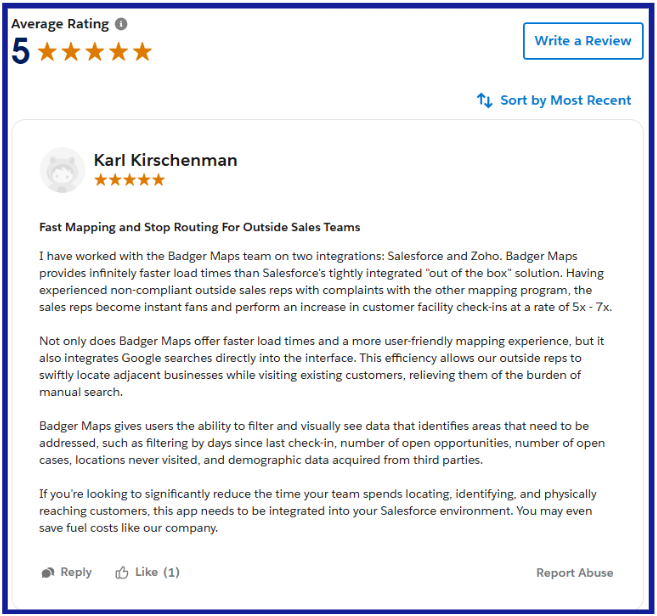
Switching from Salesforce Maps to Badger Maps Is Simpler Than You'd Expect
If Badger Maps is on your shortlist, here's what the transition actually looks like:
- Free trial: no credit card required, connect your CRM and build your first route on day one
- Data import: upload your existing account list via spreadsheet or sync directly from your CRM
- Onboarding support: Badger's customer success team helps new teams get productive quickly, and is reachable by phone when you need them
- No long-term commitment: month-to-month plans available so you can validate before committing
- 90-day money-back guarantee: if Badger isn't delivering results within 90 days, you get your money back.
Teams are fully operational within a day or two of signing up.
The Bottom Line
Salesforce Maps was built for organizations that are fully committed to the Salesforce ecosystem and need geo-intelligence layered natively on top of that investment. For that specific use case, it has real strengths and features. But a retired standalone mobile app, a total cost structure that regularly shocks buyers, prospecting data sourced from Yelp rather than Google, and a setup complexity that requires admin expertise - these are real limitations that drove real teams to look for alternatives.
For B2B outside sales reps who need a reliable mobile field tool, Badger Maps is the strongest upgrade - proven at enterprise scale, CRM-agnostic, and available today with a free trial. For desktop territory design, MapBusinessOnline is clean and affordable. For enterprise GIS and geographic analytics, Maptitude is the professional-grade choice. And for lightweight geographic data visualization without the overhead, Maply is a capable wildcard at consumer-level pricing.
Ready to see if Badger Maps is the right fit? Try it free - no credit card required, no Salesforce admin needed.

“We’ve identified over a thousand qualified leads that were not already in our CRM thanks to Badger”.
Brian Morgan
Director of Sales, GeoSearch
Do I need Salesforce to use Badger Maps?
No - Badger Maps works independently of Salesforce and integrates natively with whichever CRM your team uses. If you're currently on Salesforce, Badger connects with two-way, real-time sync. If you move to a different CRM down the road, Badger moves with you. Unlike Salesforce Maps, your field sales workflow isn't locked to any single vendor's ecosystem.
What happened to the Salesforce Maps mobile app?
Salesforce retired the standalone Salesforce Maps mobile app in August 2026, removing it from the Apple App Store and Google Play and ending all support and security updates. The standalone app had scored a 1.9 on the App Store and 2.0 on Google Play, with field reps describing consistent crashes, battery drain, and required restarts throughout the day. Maps functionality was migrated to an embedded experience within the main Salesforce mobile app.
How does Badger Maps compare to Salesforce Maps on price?
Salesforce Maps starts at $75/user/month (Maps) or $150/user/month (Maps Advanced), billed annually, on top of your existing Salesforce CRM license. Total all-in costs for a Salesforce Enterprise + Maps Advanced user can exceed $400/user/month before implementation, admin time, or additional data layer purchases. Badger Maps starts at $58/user/month for business plans and $95/user/month for enterprise plans - with a 14-day free trial and 90-day money-back guarantee included, and no Salesforce license required.
Does Badger Maps work with Salesforce?
Yes - Badger Maps integrates natively with Salesforce with two-way, real-time sync. Check-ins and notes logged in the field update Salesforce automatically, and Salesforce changes appear in Badger without manual imports. Badger also integrates natively with HubSpot, Microsoft Dynamics, Zoho, Netsuite, Pipedrive, and others.
How does lead generation work in Badger Maps vs. Salesforce Maps?
Badger Maps' Lead Generation feature surfaces nearby business prospects pulled from Google Places in real time while reps are already in the field - tap a business, review details, add it to today's route, and log the visit after. No additional data purchase required. Salesforce Maps offers prospecting through purchasable third-party data layers sourced from providers like Yelp and ATTOM - an additional cost on top of the already significant Maps and Salesforce licensing fees.
Can I try Badger Maps before committing?
Yes - Badger Maps offers a 14-day free trial with no credit card required. You can connect your CRM, import your accounts, and run optimized routes before making any purchasing decision. Salesforce Maps does not offer a free trial - an annual contract is required. A 90-day money-back guarantee is also available after purchase with Badger.
The names and logos for Badger Maps are trademarks of Badger Maps, Inc. All other trademarks, brand names, or product names belong to their respective holders. The purpose of this comparison is to provide customers with truthful information about competitors with no affiliation or partnership in place. This comparison is based on information gathered from the company's website and other 3rd party websites on the date written, and thus changes may have occurred.


