Review & Compare: Salesforce Maps vs Badger Maps
Which Field Sales Tool Is Right For You?
If you're evaluating Badger Maps against Salesforce Maps, there's one thing worth understanding before comparing any feature: Salesforce Maps is not a standalone field sales tool. It's an add-on to Salesforce CRM - and in August 2026, Salesforce retired its standalone mobile app due to its poor performance entirely, forcing users through a migration inside the broader Salesforce app.
Here’s what the comparison actually looks like when you dig past the Salesforce brand. Let’s check it out!
Badger Maps vs. Salesforce Maps: Which Field Sales Tool Is Right for You?
What Is Salesforce Maps?
Salesforce Maps is a location intelligence and territory management add-on built into the Salesforce ecosystem. Originally acquired from MapAnything in 2019 and modified, it adds geographic visualization, route optimization, territory design, and field activity tracking to organizations that are already running Salesforce as their system of record. It's used by enterprise field sales and field service teams in industries like healthcare, life sciences, trucking, and telecom - and it's good for the specific use case it's designed for: adding geo-intelligence to a large Salesforce deployment.
To illustrate: a sales operations manager at a pharmaceutical company can use Salesforce Maps to visualize the entire field team's account base across territories, design and balance territory assignments based on revenue potential and workload, and pull activity reports directly from various data points - all within the Salesforce environment.
Why users like it: G2 reviewers - many of them Salesforce admins and sales operations managers - praise the native Salesforce integration, the territory design capabilities, and geographic analytics tools that surface patterns across large datasets. For organizations where Salesforce is the single system of record, the native architecture is valuable.
Why users dislike it: The standalone Salesforce Maps mobile app scores a 1.9 on the Apple App Store and 2.0 on Google Play - the worst app store ratings of any field sales tool in this category. Field reps describe constant crashes, battery drain, required restarts multiple times per day, blank screens, and sign-out issues that interrupt the working day. One reviewer called it "by far the worst app experience I've ever come across whether on Android or Apple." Another: "This is the worst app ever created." The gap between the desktop experience and the mobile experience is one of the most consistent patterns in Salesforce Maps reviews. Good reason for Salesforce to have retired it!
What Is Badger Maps?
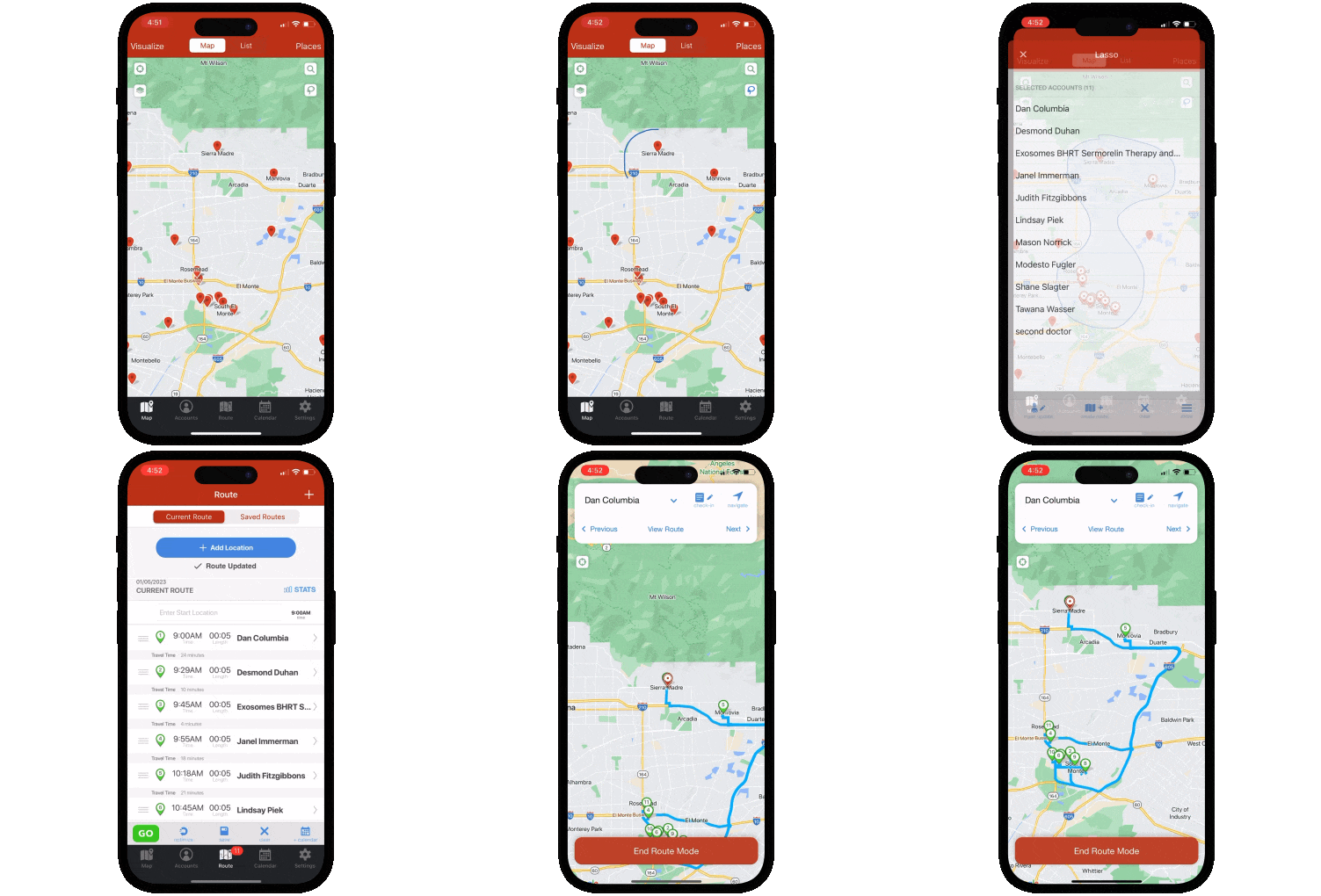
Badger Maps is the #1 field sales app for outside sales reps. It combines route optimization, CRM integration, lead generation, territory visualization, and reporting in a single mobile platform - so reps can plan smarter routes, see more customers, and spend less time on admin.
To illustrate: a medical device rep can use Badger Maps to map every hospital and clinic in their territory, filter by last visit date and priority, build an optimized multi-stop route around their highest-value accounts, discover new leads nearby with the Lead Generation feature, add voice-to-CRM notes, and sync every check-in automatically back to Salesforce - all from their phone before leaving the parking lot.
Teams using Badger Maps see an average 22% increase in sales, 20% less time spent driving, and 50% less time on admin tasks.
Why users like it: On the App Store and Google Play (where it scores a 4.5 and 4.0, respectively), users consistently praise the route optimization for saving meaningful time in the field, the reliability of the CRM sync for eliminating double data entry, and the responsiveness of the customer support team.
Why users dislike it: Some users note that they prefer the mobile app to the desktop experience. Pricing can feel steep for individual reps paying out of pocket rather than through a company plan - though many report the time savings make it pay for itself quickly.
Who Each Tool Is Built For
This is the most important distinction in this comparison - because Salesforce Maps and Badger Maps are solving fundamentally different problems.
Salesforce Maps is built for organizations that:
- Are fully in love with Salesforce and want geo-intelligence layered on top of their existing Salesforce investment - no weird data sync, no separate system of record
- Have Salesforce admin resources available to configure territory rules, routing datasets, and permission sets, as the platform requires meaningful technical expertise to set up and maintain
- Primarily need desktop-based territory intelligence - Salesforce Maps' strongest capabilities are on desktop; the standalone mobile app was so bad they retired it in August 2026
- Can absorb the full cost - Salesforce license + Maps license + potential implementation consulting, on an annual contract with no free trial
Badger Maps is built for you if you:
- Are already on Salesforce and want field sales mapping without paying an additional $75-$150/user/month on top of your existing license - Not only does it do everything SF Maps does and more, Badger integrates natively with Salesforce with two-way, real-time sync, and starts at $58/user/month
- Need a mobile app your reps will actually use in the field - Badger scores 4.5 on the App Store and 4.0 on Google Play vs. Salesforce Maps' 1.9 and 2.0
- Want in-field lead discovery pulled from Google Places - not a separately purchased data layer sourced from Yelp
- Need to be productive on day one - free 14-day trial, no Salesforce admin required to get started, no annual contract to sign before you can validate the tool
- Want CRM flexibility long-term - if your organization ever moves off Salesforce, Badger moves with you; Salesforce Maps becomes worthless overnight
Badger Maps, the Highest Ranked App in the B2B Sales Mapping Apps Category
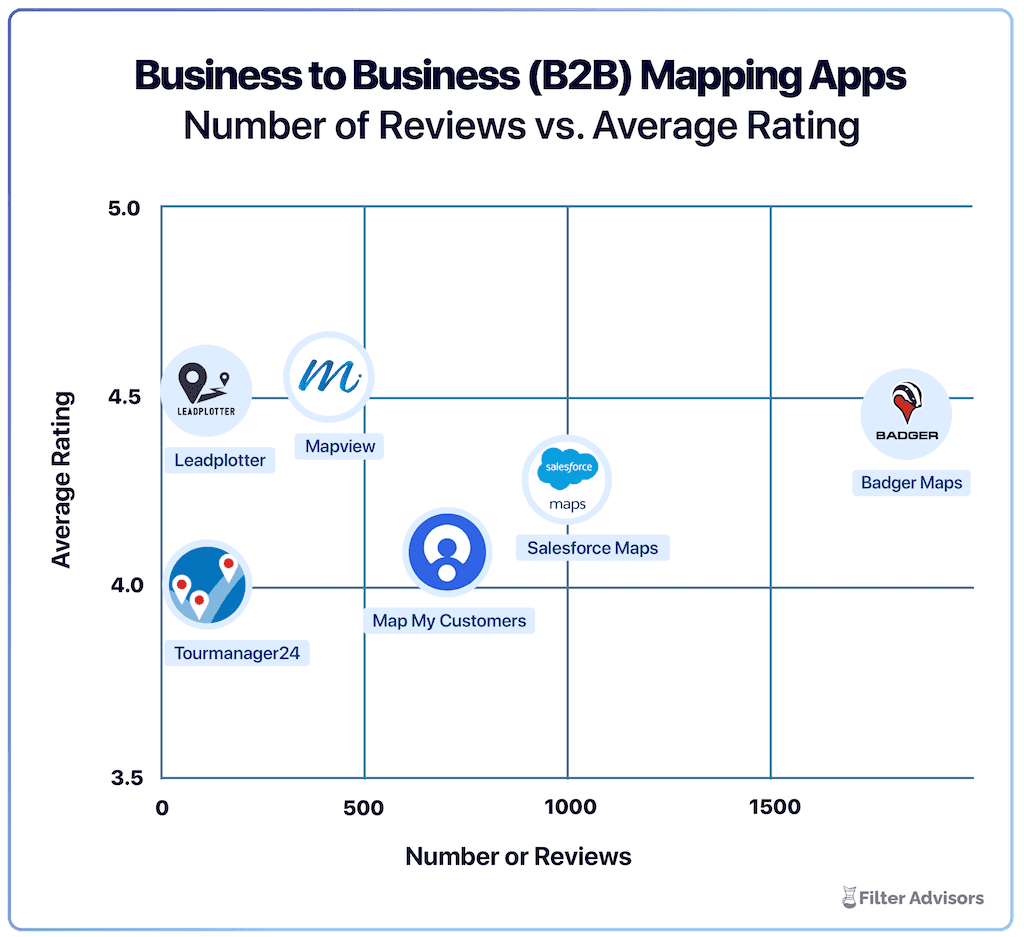
Badger is the highest ranked sales mapping and routing app, according to an industry wide analysis done by Filter Advisors, a technology consulting firm. Read more here.
Key Differences - Features & Reviews
1. Mobile App Performance: 1.9 vs. 4.5
The app store scores tell the story more clearly than any feature comparison could. Salesforce Maps scores a 1.9 on the Apple App Store and 2.0 on Google Play. Badger Maps scores a 4.5 and 4.0. For a tool whose entire value proposition is helping field reps be more productive in the field - on their phone, between appointments, all day - this gap is not a minor detail. It's the product.
The Salesforce Maps reviews from field reps are consistent and specific: "It's crashing every 20 minutes. It's hardly usable." "This is the worst app ever created. It eats your phone's battery and I have to restart it at least 5 times a day." "By far the worst app experience I've ever come across whether on Android or Apple." "Salesforce maps is buggy, slow, and almost useless." These aren't isolated complaints - they're a pattern across iOS and Android, across multiple software versions, and across multiple years.
Badger Maps is designed as a mobile-first tool for reps who are in the car multiple hours a day. The 4.5 App Store score and 4.0 Google Play score reflect a product built from the ground up to work in the field - stable while navigating between accounts, with route context that persists so you don't lose your place mid-day.
2. Total Cost of Ownership: The Salesforce Tax
Salesforce Maps pricing starts at $75/user/month for Maps and $150/user/month for Maps Advanced - billed annually, no free trial. Those numbers look steep on their own. But they don't include the Salesforce CRM license required to use Maps at all - which runs $150-$300+/user/month depending on edition. An enterprise field rep running Salesforce Enterprise + Maps Advanced could easily be at $300-$450/user/month… and that’s before accounting for implementation, Salesforce admin time, or additional feature license tiers.
And the add-on costs don't stop there. Prospecting - the ability to find new leads from within the map - is available in Salesforce Maps, but the underlying data comes from third-party sources like Yelp and ATTOM via purchasable data layers, not from Google Places. If you want richer or more current prospect data, you're looking at additional license costs for data enrichment on top of an already expensive stack.
Reviewers flag this consistently: "It's turning out to be more expensive than what I had budgeted for." "To use Salesforce Maps you need to purchase additional licences." "If you are a small business or have a small team in the field, anything Salesforce and its components should be avoided. Its price-point and ROI are overstated." One reviewer put it most directly: "ROI was zero. We spent weeks of time and whatever license cost for a product that did not deliver."
Badger Maps starts at $58/user/month for business plans and $95/user/month for enterprise plans. If you're already on Salesforce, Badger integrates natively with it - meaning you get field sales mapping, route optimization, lead generation, and territory management on top of your existing Salesforce investment, without paying an additional $75-$150/user/month for a Maps license. The Lead Generation feature pulls from Google Places - no additional data layer purchase required. And a 14-day free trial means you can validate it before committing, something Salesforce Maps doesn't offer.
3. CRM Lock-In vs. CRM Flexibility
Salesforce Maps exists entirely within the Salesforce database. Every record it visualizes, every route it builds, every check-in it logs - all of it lives in Salesforce and only in Salesforce. This native integration is the source of its greatest strength and its greatest risk: if your organization ever moves off Salesforce - reduces its footprint, switches CRMs, or renegotiates licensing - Salesforce Maps becomes worthless overnight. You can't take it with you.
For organizations fully committed to Salesforce at enterprise scale with no issues and no plans to change, that dependency is manageable. For organizations that are still evaluating their CRM landscape, running Salesforce alongside other systems, or simply want the optionality of not being locked to a single vendor's ecosystem, it's a meaningful constraint.
Badger Maps integrates natively with Salesforce, HubSpot, Microsoft Dynamics, Zoho, Netsuite, Pipedrive, and others. If you're on Salesforce today and move to HubSpot tomorrow, Badger moves with you. Your field sales workflow isn't hostage to any single vendor's pricing decisions.
4. Setup Complexity and Usability
Salesforce is a powerful platform, and it shows in the configuration requirements of their maps add-on. Setting up territory rules, routing datasets, permission sets, and custom data layers requires Salesforce admin expertise. Reviewers consistently describe a steep learning curve that goes beyond typical software onboarding: "Configuring territories, rules, and datasets can be quite complex, especially for organizations with large or intricate data models. It often requires admin expertise or consulting support." Another: "The learning curve is not worth the time or effort." And on support: "Support was comical. It was barely available and the few times I did get help the language barrier was extraordinarily problematic."
The interface itself draws consistent criticism even from users who've been through the learning curve - "Salesforce Maps can feel like it's stuck in the past. The user experience isn't as intuitive as it should be." The platform has accumulated significant feature complexity over years of enterprise development, and that breadth shows in an interface that takes meaningful investment to navigate efficiently.
Badger Maps is built for fast deployment. Most reps can connect their CRM, upload their accounts, and build their first optimized route the same day they sign up. No Salesforce admin required, no consulting engagement, no permission set configuration. The interface is designed for sales managers and their reps who need to use it between appointments. Badger Maps is purposeful and tight, with relevant features driven by what salespeople need.
| How they compare | Badger Maps | Salesforce Maps |
|---|---|---|
| Works without Salesforce license | ✓ Yes | ✗ No |
| Mobile app reliability | ✓ 4.5 Apple / 4.0 Google | ✗ Retired Aug 2026 |
| Route optimization & mileage tracking | ✓ Full | △ Partial |
| Lead generation | ✓ Full | ✗ Yelp / add-on cost |
| Native two-way CRM sync | ✓ Full (all plans) | △ Salesforce only |
| Phone, chat & email support | ✓ Full | △ Partial |
| Free trial available | ✓ Yes | ✗ No |
| 90-day money-back guarantee | ✓ Yes | ✗ No |
✓ Full △ Partial / limited ✗ Not available
Where Badger Maps Wins
For outside sales reps managing a geographic territory of business accounts, Badger Maps is the purpose-built choice. The full field sales workflow lives in one place - visualize accounts on a map, build and optimize your route, check in after every meeting with voice-to-CRM AI notes, generate leads nearby in real-time, and sync everything back to your CRM - reliably, from your phone, every day. At $58/user/month including a free trial and 90-day money-back guarantee, it delivers the field productivity that Salesforce Maps promises at a fraction of the total cost - without requiring a Salesforce contract to access it.
Where Salesforce Maps Might Be a Better Fit
Salesforce Maps is worth a serious look if your organization is fully standardized on Salesforce at enterprise scale, has Salesforce admin resources available to configure and maintain the platform, and primarily needs desktop-based territory intelligence and geo-analytics layered natively on top of your existing Salesforce investment. For large enterprise teams where native CRM architecture is a non-negotiable requirement and field sales is one of many use cases on the Salesforce platform, Maps is the most defensible choice - provided it delivers a meaningfully better experience than the standalone maps app they retired.

“CRM usage increased more than 50% once our sales team adopted Badger”
Ken Buck
Regional Sales Manager, Danaher
Switching to Badger Maps Is Straightforward
If you're currently using Salesforce Maps and considering a switch, the transition is simpler than most teams expect - and with the standalone Maps app being retired recently, now may be a natural moment to evaluate alternatives.
- Free trial: no credit card required, connect your CRM and build your first route on day one
- Data import: upload your existing account list via spreadsheet or sync directly from your CRM
- Onboarding support: Badger's customer success team helps new teams get productive quickly, and is reachable by phone when you need them
- No long-term commitment: month-to-month plans available so you can validate the tool before committing
- 90-day money-back guarantee: if Badger isn't delivering results for your team within 90 days, you get your money back. No fine print.
Teams are fully operational within a day or two of signing up.
The Bottom Line
Salesforce Maps is a decent geo-intelligence layer for enterprise organizations that are fully committed to Salesforce. But a 1.9 App Store score and 2.0 Google Play score, a total cost that routinely shocks buyers, a UI reviewers describe as complex and dated, and prospecting data sourced from Yelp rather than Google - these are real limitations that matter for field reps who need a tool that works in the field every day.
If you need a field sales platform that works reliably on your phone, integrates with whatever CRM you use, surfaces leads while you're already in the area, and doesn't require a Salesforce contract just to get started - Badger Maps is built for exactly that.
Ready to see it in action? Start your free trial and build your first optimized route in minutes.
THE BEST APP FOR FIELD SALES PEOPLE
Learn how you can maximize your sales routes & sell more with Badger Maps.
Do I need Salesforce to use Salesforce Maps?
Yes - Salesforce Maps is an add-on to Salesforce CRM and cannot be used without an active Salesforce license. This means you're paying for two separate licenses: your Salesforce CRM subscription ($150-$300+/user/month depending on edition) plus the Salesforce Maps subscription ($75-$150/user/month). Badger Maps integrates with Salesforce but doesn't require it - and works equally well with HubSpot, Microsoft Dynamics, Zoho, Netsuite, Pipedrive, and others.
What happened to the Salesforce Maps mobile app?
Salesforce retired the standalone Salesforce Maps mobile app in August 2026 - removing it from the Apple App Store and Google Play and ending all support and security updates. The features were migrated to Maps functionality embedded within the main Salesforce mobile app. The standalone app scored a 1.9 on the App Store and 2.0 on Google Play, where field reps often described consistent crashes, battery drain, and required restarts throughout the day.
Does Badger Maps work with Salesforce?
Yes - Badger Maps integrates natively with Salesforce with two-way, real-time sync. Check-ins and notes logged in the field update Salesforce automatically, and Salesforce changes appear in Badger without manual imports. Unlike Salesforce Maps, Badger also integrates natively with HubSpot, Microsoft Dynamics, Zoho, Netsuite, Pipedrive, and others - so your field sales workflow isn't locked to any single CRM vendor.
How does lead generation work in Badger Maps vs. Salesforce Maps?
Badger Maps' Lead Generation feature surfaces nearby business prospects pulled from Google Places in real time while reps are already in the field - tap a business, review details, add it to today's route, and log the visit after. No additional data purchase required. Salesforce Maps offers prospecting through purchasable third-party data layers - sourced from providers like Yelp and ATTOM rather than Google Places - which are an additional cost on top of the already significant Maps and Salesforce licensing fees.
What does Badger Maps cost compared to Salesforce Maps?
Salesforce Maps starts at $75/user/month (Maps) and $150/user/month (Maps Advanced), billed annually, on top of your existing Salesforce license. Total all-in cost for a Salesforce Enterprise + Maps Advanced user can exceed $400/user/month before accounting for implementation, admin time, or additional data layer purchases. Badger Maps starts at $58/user/month for business plans and $95/user/month for enterprise plans - with a 14-day free trial, no credit card required, and a 90-day money-back guarantee.
Can I try Badger Maps before committing?
Yes - Badger Maps offers a 14-day free trial with no credit card required. You can connect your CRM, import your accounts, and run optimized routes before making any purchasing decision. Salesforce Maps does not offer a free trial - an annual contract is required. A 90-day money-back guarantee is also available after purchase with Badger.
The names and logos for Badger Maps are trademarks of Badger Maps, Inc. All other trademarks, brand names, or product names belong to their respective holders. The purpose of this comparison is to provide customers with truthful information about competitors with no affiliation or partnership in place. This comparison is based on information gathered from the company's website and other 3rd party websites on the date written, and thus changes may have occurred.


