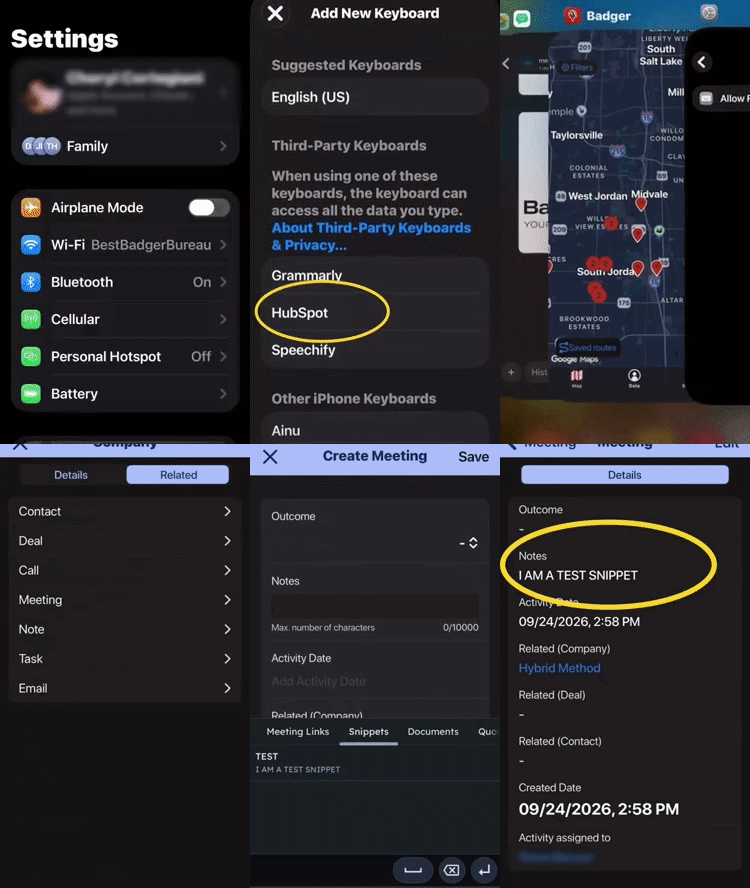
Adding HubSpot Snippets to Badger Maps (iPhone)
HubSpot Snippets is a handy productivity tool in the HubSpot CRM platform. You can also add it to the Badger Maps mobile app, and this guide will show you how to set it up on your iPhone.
1. First, download the HubSpot mobile app on your phone.
2. If you haven't created snippets yet, go ahead and create them.
3. Next, open up your phone’s Settings, type Keyboard, and tap Keyboards (General > Keyboard).
4. On the Keyboards menu, tap Keyboards, and choose Add New Keyboard.
5. Choose Hubspot, then Allow Full Access, confirm your choice by tapping Allow, and you’re all set!