It's a question more sales and IT leaders are asking: With AI, couldn't we just build this ourselves? Someone puts together a quick prototype, whether it's a custom CRM, a mapping app or a reporting tool, and suddenly it looks like an easy way to cut software spend.
It's a fair question, and for some tools the answer really is yes. But the solutions your sales team runs on every day are a different kind of project. Before committing to a build, it's worth looking at what you'd actually be taking on, not just at launch, but for years after.
The prototype is the easy part
Getting a working prototype is easier than ever. A capable developer, or a determined analyst with an AI assistant, can have something convincing on screen in a week: a list of accounts, a dashboard, maybe a map.
What doesn't show up in a prototype is everything a solution has to handle once your whole team relies on it:
- Data that stays accurate. Duplicate records, conflicting edits, records updated offline and synced later, and fields that mean different things to different teams.
- Integrations that keep working. Every system you connect to, from email and calendars to ERPs and marketing tools, changes on its own schedule. Each change can quietly break a connection.
- Permissions and security. Who can see which accounts, who can edit what, how access is removed when someone leaves, and how sensitive customer data is protected and audited.
- The experience of users who aren't at a desk. Mobile apps, iOS and Android updates. People will abandon a tool the first time it's slow when they need it.
- Change that never stops. Teams reorganize, processes evolve and new requirements arrive from leadership, legal and IT.
None of this is visible when a solution is working well out of the box. It's the result of years of solving problems that real teams ran into. When you build your own, you don't just build the features. You rediscover those problems yourself, usually one frustrated user at a time.
You would be rebuilding a system, not a feature
Most build conversations start with one visible feature: "We just need accounts on a map," or "We just need a simpler way to log visits." But the solutions sales teams depend on are rarely one feature. They're systems, where each part feeds the others.
Take Badger Maps as an example. Reps see maps and routes, but behind them is a connected system that serves the whole sales team:
- For reps: account mapping, route optimization, lead generation, data capture, follow-ups and CRM updates from the field, plus AI that plans the week, preps meetings and drafts follow-ups.
- For managers and leaders: the ability to direct what happens in the field. Build and assign routes, reassign accounts when territories or teams change, and verify what's happening in the field. Automatic activity reports turn that into coaching conversations.
- For the business: shared visibility, and a CRM that works harder. Reps, managers and leadership all work from the same picture of accounts and field activity. Because that activity syncs to the CRM as it happens, the CRM works harder: triggering workflows, follow-up sequences, and other automations the moment a visit is logged.
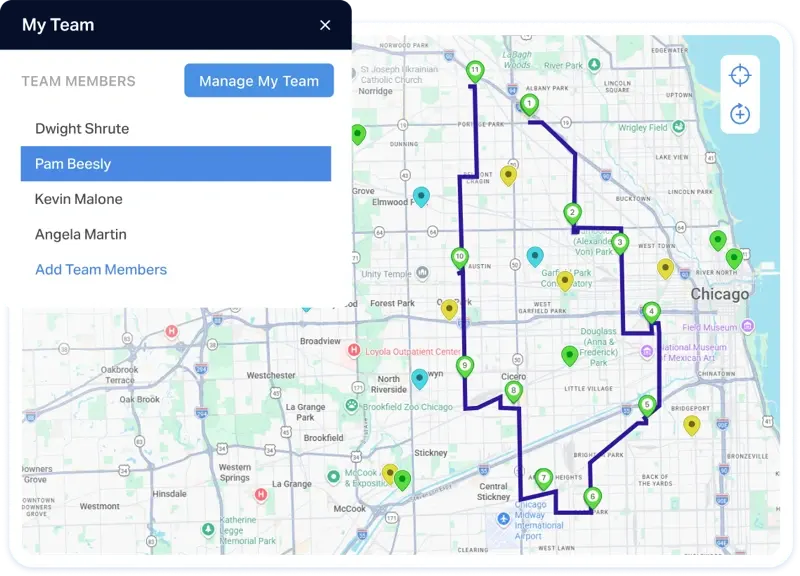
These pieces depend on each other. A manager reassigns accounts, and they appear on a rep's map the same day. The rep visits, and the verified check-in updates the CRM and the manager's reports. Those reports show which accounts are getting attention and which aren't, which shape the next round of assignments and coaching conversations. Remove one piece and the loop breaks.
That's why a "simple" in-house build so often ends up incomplete. Rebuilding the rep-facing app is the obvious part. Rebuilding the oversight and reporting that managers rely on is where much of the real scope, and the real cost, sits.
What AI changes, and what it doesn't
AI has made building software faster, and for some tools building in-house is the right answer. A script that cleans up a spreadsheet, a one-off report, a quick summary of meeting notes: if it's simple, low-risk and only matters to your team, build it.
Core business solutions are different. Here's what AI doesn't change:
When it breaks, you have to fix it. Once your solution is live, someone has to keep it running. That means fixing bugs that only appear with real data, responding when an integration breaks before a big sales week, keeping apps compatible with new devices and operating systems, and patching security issues in the components it depends on. A software company spreads that work across thousands of users. When you build your own, every fix belongs to you and you alone. The time of a person who can build and maintain software is generally far more expensive than the cost of buying the software.
The feature requests keep coming. Your users will want what they've seen in other tools. Your managers will want new reports. Your other systems will change. Each request becomes a project that competes for the same internal resources as everything else your team is responsible for.
Software companies have AI too. Whatever productivity boost AI gives your internal team, it gives specialized software companies a lift as well, and they invest it across their whole customer base. That's how new AI capabilities reach customers without each company having to build them alone. For example, Badger Maps has 10,000 customers that are effectively cost sharing our 30 person engineering team.
The easy version isn't the valuable version. If a basic version were all teams needed, there would already be a free tool that did it well. The value is in the details that make people actually use and get value from a solution every day.
The real cost of building
A build estimate usually covers the first version. The full cost over the life of a solution includes much more:
- The initial build: design, development, testing and integrations.
- Mobile and device support: apps for the devices your team uses, and the updates needed to keep them working.
- Ongoing maintenance: bug fixes, integration issues, security patches and infrastructure upgrades.
- Support: someone users can turn to when something isn't working.
- New features: everything users and managers ask for after launch.
- People risk: what happens when the person who built it changes roles or leaves the company.
- Opportunity cost: the projects your team isn't doing while it maintains an in-house solution.
When you buy, most of these are part of what you pay for. When you build, each one becomes an ongoing line item, whether or not it appears in the original budget.
Is this your competitive advantage?
The simplest test for buy vs. build is this: Does building it ourselves make us better at what our customers pay us for?
If the answer is yes, invest. That's where custom software earns its keep. But for most companies, the advantage is their products, their customer relationships and their people. A CRM or sales solution supports that advantage. It isn't the advantage itself. Building one means taking on the job of a software company, with exactly one customer: you.
Questions to ask before you build
If your team is seriously considering an in-house build, these questions will help you make the decision with the full picture:
- What problem are we solving? Is it a missing feature, cost, a workflow that doesn't fit, or something else? Each has a different best answer.
- What will it really cost over three years? Include development, maintenance, support, internal staff time and new features, not just the initial build.
- Who will maintain it, and what happens when they leave? This is often the deciding question.
- How will it handle our data, our integrations and our edge cases? Test the prototype with real data, real users and real workloads.
- What will users do when it breaks? Sales teams can't wait days for a fix in the middle of a quarter.
- How will we keep up with new capabilities? AI is changing what business software can do quickly. Plan for how your solution will keep pace.
- What else could our team build with that time? Weigh the build against the projects that set your business apart.