The Best Mapsly Alternatives in 2026
Which Field Sales Tool Is Right For You?
Mapsly has real strengths - its geo-intelligence depth and no-code automation suite are genuinely impressive. But if you've found yourself fighting a mobile app that crashes mid-route, waiting days for support responses on basic integration questions, or spending weeks configuring a tool before your reps can use it productively in the field, you're not alone. These are the patterns that show up consistently across Mapsly's user reviews - from software reviewers to CRM marketplaces, and of course the app stores from Apple and Google - and they're legitimate reasons to look elsewhere.
This guide covers the strongest Mapsly alternatives, starting with the one we think makes the most sense for B2B field sales teams.
The Best Mapsly Alternatives for Field Sales Teams in 2026
What to Look for in a Field Sales Mapping Tool
Not all mapping and geo-intelligence tools are built for the same purpose. Before making a switch, it helps to get clear on what your team actually needs - because the right answer for a sales ops manager building territory models is very different from the right answer for a rep visiting 6+ accounts a day.
Mobile-first reliability: if your reps use the tool in the field on a phone, mobile performance isn't a nice-to-have. It's the product. A 2.7 App Store score and zero Google Play reviews - like Mapsly's - tells you something specific about how a tool performs when it leaves the desk.
Time to value: how long before your reps are actually productive? Some platforms require scheduled onboarding calls, weeks of configuration, and a technical resource to manage ongoing workflows. Others get a rep up and running the same day. Know which you need.
CRM integration: native, two-way, real-time sync so field activity flows back to your CRM automatically. Zapier-style connections introduce lag and failure points. And unlike a standalone platform, a true integration means your existing data model stays intact.
Territory management: the ability to visualize, design, and optimize your sales territories - not just plot accounts on a map. The best field sales platforms let you align territories by workload, geography, and account potential, and adjust them as your team needs.
Lead generation: the ability to find new prospects while you're already in an area, add them to your route, and log the visit - without switching apps.
Scalability: does the tool serve individual reps as well as enterprise teams? The best field sales platforms scale from a single rep paying out of pocket all the way to 1,000+ seat deployments without sacrificing field usability at either end.
Not every tool checks every box. We'll be specific about what each one does and doesn't cover, and what might be right for you and your use case.
1. Badger Maps - Best Overall Mapsly Alternative for Field Sales Teams
Badger Maps is the #1 field sales app for outside sales reps - and the most complete Mapsly alternative for B2B field sales teams of any size. Where Mapsly's 2.7 App Store score and zero Google Play reviews reflect a product that was built for ops teams at a desk, Badger Maps is purpose-built for the full field sales workflow - from morning route planning to post-visit CRM sync - on a platform that holds up reliably in the field every day.
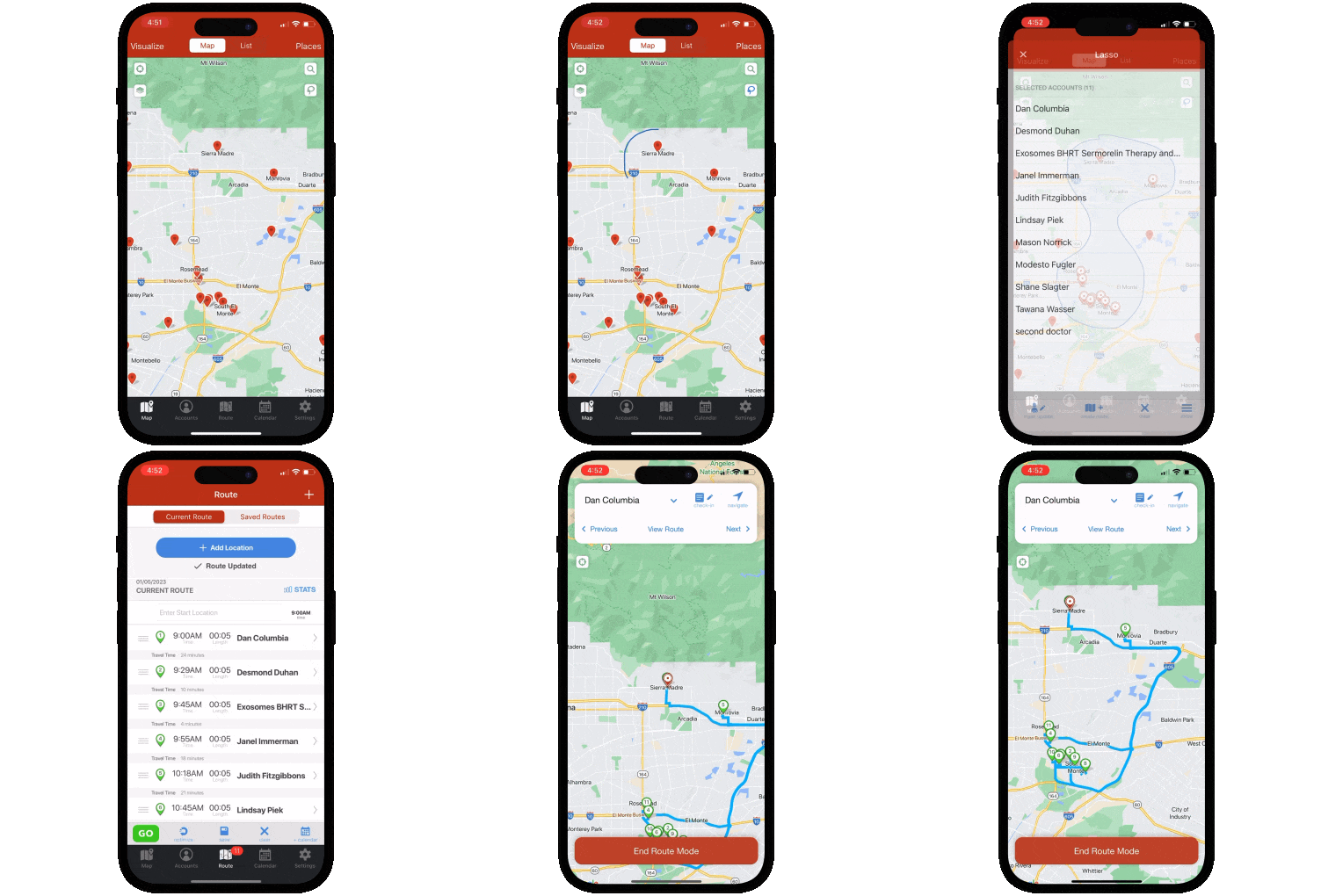
To illustrate: a medical device rep can use Badger Maps to map every hospital and clinic in their territory, filter by last visit date and priority, build an optimized multi-stop route around their highest-value accounts, discover new leads nearby with the Lead Generation feature, and sync every check-in automatically back to Salesforce - all from their phone before leaving the parking lot.
And it scales. Badger Maps serves individual reps paying out of pocket and enterprise teams with 1,000+ seats - without sacrificing the field usability that makes it work for the rep on the ground.
What Badger does well:
- Optimizes multi-stop routes automatically with live traffic, saving reps an average of 20% of drive time
- Scores 4.5 on the App Store and 4.0 on Google Play - built for the field, not just the desk
- Native two-way, real-time integration with Salesforce, HubSpot, Microsoft Dynamics, Zoho, Netsuite, Pipedrive, and more
- Generates new leads on the map via the Lead Generation feature - no separate prospecting tool needed
- Logs check-ins and notes after every visit, syncing automatically back to your CRM - no double entry
- Gives managers territory-level visibility via weekly reports and activity summaries without micromanaging
- Includes mileage tracking, territory alignment, lead routing, and reporting as core features - not add-ons
- Support available by chat, email, and phone - reachable when you need them in the field
Who it's best for: B2B outside sales reps and field sales managers at any team size - from individual reps to enterprise deployments - who need route efficiency, CRM accuracy, and territory visibility in one reliable mobile platform.
Pricing: Starts at $58/user/month for business plans and $95/user/month for enterprise plans. 14-day free trial available - no credit card required. 90-day money-back guarantee.
| Features At-a-Glance | Badger Maps |
|---|---|
| Route optimization (with live traffic) | ✓ Full |
| Territory mapping & alignment | ✓ Full |
| Native two-way CRM sync | ✓ Full |
| Lead generation (in-field) | ✓ Full |
| Mileage tracking | ✓ Full |
| Mobile app reliability | ✓ Full |
| Phone, chat & email support | ✓ Full |
| 90-day money-back guarantee | ✓ Yes |
2. Salesforce Maps - Best for Teams Already on Salesforce
If your organization is part of the ol' Salesforce ecosystem, there is a legitimate question worth asking before paying for a third-party geo-intelligence platform like Mapsly: why use a clone of Salesforce Maps when you could use the real thing?
Salesforce Maps is the native mapping and territory intelligence solution built directly into the Salesforce ecosystem. It visualizes your Salesforce data on an interactive map, optimizes routes, manages territories, and tracks field activity - all without leaving Salesforce. If your team already lives in Salesforce, the integration story is as tight as it gets: no sync, no connector, no data model mismatch - your Salesforce data is the map.
To illustrate: a sales manager at a pharmaceutical company can use Salesforce Maps to visualize their entire account base on a map, assign territories to reps based on geography and workload, build optimized routes for each rep's day, and pull activity reports directly from Salesforce - without any data leaving the Salesforce environment.
What it does well: The Salesforce-native integration is genuinely unmatched for teams that are fully invested in the ecosystem. Territory planning, route optimization, live location tracking, and AI-powered deal insights all pull directly from your Salesforce data. The resources of a company the size of Salesforce behind it also mean ongoing development, enterprise security, and reliability that a smaller third-party platform like Mapsly can't match.
Where it falls short: Salesforce Maps is only useful if your team is on Salesforce - it has no value outside that ecosystem. Reviewers consistently flag a steep learning curve, limited mobile functionality compared to the desktop experience, and pricing that can feel steep once it stacks on top of existing Salesforce licenses. If you're not a Salesforce shop, this tool doesn't exist for you.
Who it's best for: Enterprise sales teams that are fully committed to the Salesforce ecosystem and want a native, deeply integrated mapping and territory intelligence solution - not a third-party layer on top.
Pricing: $75/user/month for Maps, $125/user/month for Maps Advanced - billed annually, on top of existing Salesforce licensing costs. No free trial available.
3. eSpatial - Best for Territory Planning and Geographic Data Analysis
If the reason you evaluated Mapsly was primarily territory design and geographic data visualization - rather than field rep productivity - eSpatial is a more focused and purpose-built tool for that specific problem.
eSpatial is a cloud-based mapping platform engineered for sales operations, RevOps, and business intelligence teams that need to design, visualize, and balance territories using data. Its core strength is "what-if" scenario planning: model different territory structures based on workload, revenue potential, account count, or travel time before committing to any alignment. For organizations going through restructuring, expansion, or annual territory reviews, that scenario planning capability is genuinely powerful.
To illustrate: a sales ops director at a manufacturing company can use eSpatial to upload their full account list, algorithmically generate balanced territory proposals based on revenue potential and account density, model three different alignment scenarios side by side, and export the final map directly into a board presentation - all in an afternoon.
What it does well: eSpatial's territory optimization algorithms, workload balancing, and scenario planning depth are among the best in the category. The interface is notably user-friendly for a platform with this much analytical power, and the customer support team is consistently praised for being responsive and genuinely helpful. Maps can be shared and exported easily for presentations and stakeholder reviews.
Where it falls short: eSpatial is a territory planning and data visualization tool - it is not a field rep productivity platform. It doesn't optimize daily routes for reps in the car, doesn't log check-ins, doesn't integrate with CRMs for field activity sync, and doesn't generate leads in the field. It also doesn't offer a free trial, and pricing starts at $1,495/year for the entry plan with the territory management features most teams actually need requiring the higher tiers. No mobile field app to speak of.
Who it's best for: Sales ops and RevOps teams whose primary need is territory design, workload balancing, and geographic data visualization for strategic planning - not field rep day-to-day productivity.
Pricing: Map Maker plan starts at $1,495/year. Team Map Maker at $2,995/year. Territory Map Maker at $7,995/year. No free trial available.
4. OptimoRoute - Best for Delivery and Logistics Route Management
If you evaluated Mapsly because your team manages delivery routes, service calls, or field logistics - rather than B2B sales territory visits - OptimoRoute is purpose-built for that workflow in a way that Mapsly is not.
OptimoRoute is a dedicated delivery and logistics route optimization platform trusted by businesses in food and beverage, waste management, field service, and retail distribution. It plans and optimizes routes across fleets of drivers, handles complex delivery constraints like time windows and vehicle capacity, tracks drivers in real time, and sends automated customer notifications - all through a clean interface that reviewers consistently describe as easier to learn than most alternatives.
To illustrate: a regional food distribution manager can use OptimoRoute to import 500 delivery orders from a spreadsheet, automatically generate optimized routes across 12 drivers that account for vehicle capacity, delivery time windows, and driver working hours, track every driver in real time from a central dashboard, and send automated ETA texts to customers - all before the first driver leaves the depot.
What it does well: OptimoRoute's routing algorithms are purpose-built for delivery and logistics constraints - vehicle capacity, time windows, multi-day routing, proof of delivery capture, and real-time driver tracking. Pricing is competitive and transparent, the 30-day free trial is genuinely generous, and the customer support team is rated highly for responsiveness. It also has a clean driver-facing mobile app that works reliably in the field.
Where it falls short: OptimoRoute is not a field sales tool. It doesn't manage CRM accounts, doesn't log sales check-ins, doesn't generate leads, and doesn't visualize a sales territory. Its pricing is per driver rather than per user, which can become costly for larger fleets. Some reviewers also note difficulty with manual route overrides and a learning curve on the more advanced parameter settings.
Who it's best for: Businesses managing delivery fleets, field service dispatch, and logistics routing - not B2B outside sales reps managing a geographic account territory.
Pricing: Lite plan starts at $35.10/driver/month. Pro plan at $44.10/driver/month. Enterprise pricing via custom quote. 30-day free trial available.
THE BEST APP FOR FIELD SALES PEOPLE
Learn how you can maximize your sales routes & sell more
How to Choose the Right Mapsly Alternative
The right tool depends entirely on what broke down with Mapsly - and what your team actually does in the field:
If your issue was mobile reliability, Badger Maps is the clearest answer. A 4.5 App Store score reflect a product that was built for field use, not configured for it.
If your issue was support responsiveness, waiting days for answers on integration questions - both Badger Maps and OptimoRoute consistently outperform Mapsly in this area, with phone support available and same-day response times reported by users.
If your issue was setup complexity, requiring a scheduled onboarding call and weeks of configuration before your reps are productive - Badger Maps is up and running same day for most teams.
If you're a Salesforce-native organization that evaluated Mapsly as a geo-intelligence layer on top of Salesforce, the honest question is whether Salesforce Maps is actually the more logical fit given your existing infrastructure.
If your primary need is geographic data analysis for strategic planning rather than field rep productivity, eSpatial's scenario planning and workload balancing capabilities are more purpose-built for that workflow.
If your team manages delivery or logistics routing rather than B2B sales territory visits, OptimoRoute is built for exactly that use case and Mapsly was likely the wrong evaluation from the start.
For B2B outside sales reps and field sales managers who visit multiple business accounts per day, need reliable mobile performance, and want a CRM that stays accurate without manual entry - Badger Maps is the strongest choice on this list.
Badger Maps, the Highest Ranked App in the B2B Sales Mapping Apps Category
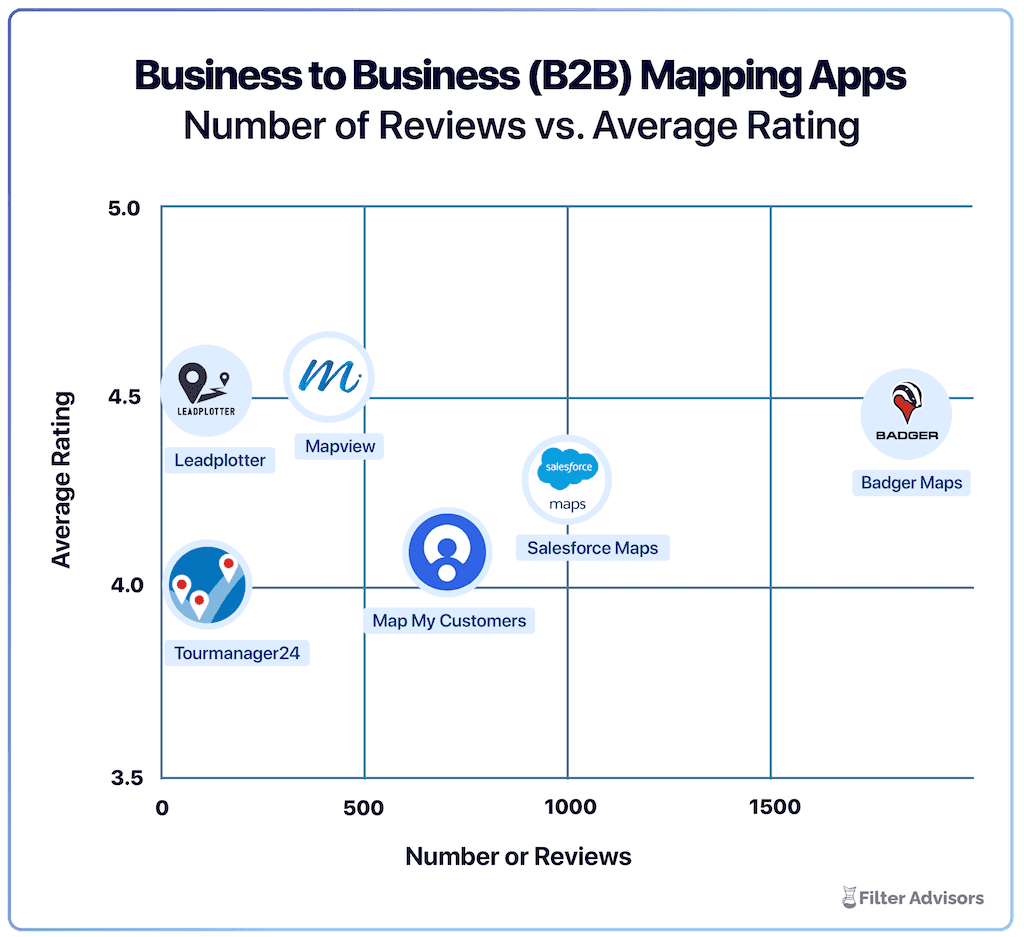
Badger is the highest ranked sales mapping and routing app, according to an industry wide analysis done by Filter Advisors, a technology consulting firm. Read more here.
Switching from Mapsly to Badger Maps Is Simpler Than You'd Expect
If Badger Maps is on your shortlist, here's what the transition actually looks like:
- Free trial: no credit card required, connect your CRM and build your first route on day one
- Data import: upload your existing account list via spreadsheet or sync directly from your CRM
- Onboarding support: Badger's customer success team helps new teams get productive quickly, and is reachable by phone when you need them
- No long-term commitment: month-to-month plans available so you can validate before committing
- 90-day money-back guarantee: if Badger isn't delivering results within 90 days, you get your money back.
Teams are fully operational within a day or two of signing up.
The Bottom Line
Mapsly is a capable geo-intelligence platform for ops teams that need enterprise-grade customization and are willing to invest the time to configure it. But the 2.7 App Store score, zero Google Play reviews, steep setup complexity, and support delays that field users report are real - and they're not minor inconveniences for a rep who's on the road 6-8 hours a day counting on their tool to work.
For B2B outside sales reps and field sales managers at any team size, Badger Maps is the most complete upgrade - reliable in the field, up and running same day, and built to make the CRM you already use significantly more useful without replacing it. For Salesforce-native enterprise teams, Salesforce Maps is the native alternative worth evaluating. For ops and RevOps teams focused on territory design, eSpatial is purpose-built for that workflow. And for logistics and delivery teams, OptimoRoute is the category leader.
Ready to see if Badger Maps is the right fit? Try it free - no credit card required, no long-term commitment.

"After getting Badger Maps, weekly meetings per rep jumped from 12 to 20. This led to a 22% increase in annual revenue."
Brad Moxley
Business Development Manager, Cutter & Buck
What's the main difference between Mapsly and Badger Maps?
Mapsly is an enterprise geo-intelligence platform built for sales ops teams who need deep customization - primarily configured and used from a desktop, with a 2.7 App Store score that reflects its limitations in the field. Badger Maps is a mobile-first field sales platform built for reps who are in the car all day, with a 4.5 App Store score, same-day deployment, and a full workflow that covers route optimization, CRM sync, lead generation, and territory visibility in one reliable app.
Why do teams switch from Mapsly to Badger Maps?
The most common triggers are mobile reliability, support responsiveness, and time to value. Mapsly's app struggles when field reps use it on a phone - crashes, slow loading, and an iOS update that broke the app entirely for a period. Support for integration questions can take days. And getting a team productive with Mapsly requires a scheduled onboarding call and meaningful configuration time. Badger Maps addresses all three: strong mobile scores, phone support, and same-day deployment.
Does Badger Maps work for enterprise teams, not just individual reps?
Yes - Badger Maps scales from individual reps to enterprise deployments of 1,000+ seats. The platform is designed to serve both without sacrificing field usability at either end. Enterprise plans at $95/user/month include advanced team management, territory alignment, and reporting features built for large field sales organizations.
Does Badger Maps integrate with my CRM?
Yes - Badger Maps integrates natively with Salesforce, HubSpot, Microsoft Dynamics, Zoho, Netsuite, Pipedrive, and others. The sync is two-way and real-time - check-ins and notes logged in the field update your CRM automatically, and CRM changes appear in Badger without manual imports.
How long does it take to get started with Badger Maps?
Most reps can connect their CRM, upload their accounts, and build their first optimized route the same day they sign up. No implementation team required, no onboarding call needed to unlock basic features - and Badger's support team is reachable by phone if you need help.
What does Badger Maps cost compared to Mapsly?
Mapsly starts at $25/user/month for the Essential plan, but territories and automation - features most field sales teams actually need - require the Pro or Enterprise tier, which is custom-priced, with additional usage-based fees for routing, automation, and storage overages. Badger Maps starts at $58/user/month for business plans and $95/user/month for enterprise plans, with a 14-day free trial and 90-day money-back guarantee included - no hidden overage fees.
Can I try Badger Maps before committing?
Yes - Badger Maps offers a 14-day free trial with no credit card required. You can connect your CRM, import your accounts, and run optimized routes before making any purchasing decision. A 90-day money-back guarantee is also available after purchase.
The names and logos for Badger Maps are trademarks of Badger Maps, Inc. All other trademarks, brand names, or product names belong to their respective holders. The purpose of this comparison is to provide customers with truthful information about competitors with no affiliation or partnership in place. This comparison is based on information gathered from the company's website and other 3rd party websites on the date written, and thus changes may have occurred.


