Review & Compare: Mapline vs Badger Maps
Which Field Sales Tool Is Right For You?
If you're evaluating Badger Maps against Mapline, you're likely seeing two tools that look related on the surface - both put your data on a map. But dig past the homepage and the difference is stark: one is a field sales app built for reps who are out visiting accounts every day, the other is a spreadsheet-to-map visualization tool built for analysts and operations teams working from a desk.
This guide breaks down the real differences so you can make the right call for you and your team. Let's dive in!
Badger Maps vs. Mapline: Which Field Sales Tool Is Right for You?
What Is Mapline?
Mapline is a web-based geo-mapping and business intelligence tool built for turning spreadsheets into visual maps, charts, and dashboards. By Mapline's own description, it's aimed at businesses that want to plot locations, build territories, run distance calculations, and track company-wide KPIs - not specifically at reps who need to plan and drive a daily route. Mapline's own comparison page against Badger Maps makes this positioning explicit, describing itself as a tool for "tracking overall business performance and growth opportunities" rather than a dedicated sales execution tool.
To illustrate what Mapline does in practice: An operations analyst at a distribution company can paste a spreadsheet of store or customer locations into Mapline, draw territory boundaries by hand or by zip code overlay, build a heat map of sales performance by region, and generate a distance grid to identify the nearest supply option for each location (via computer browser, no mobile app involved).
Why users like it: Mapline has a very small footprint on independent review platforms. Capterra shows an overall rating around 4.8 out of 5, but from only 4 reviews total - a sample size too small to draw much confidence from. The reviews that do exist point to real value for spreadsheet-heavy teams: the ability to visualize location data quickly without GIS expertise, and drag-and-drop dashboard building.
Why users dislike it: Even within that small review sample, a consistent set of frustrations shows up. Mapline has no native mobile app at all - it's browser-only, on desktop or phone, which matters a lot for anyone trying to use it in the field rather than at a desk. Reviewers also flag usability friction: difficulty customizing region colors, addresses that sometimes geocode to the wrong spot and throw off routes, and a learning curve that one reviewer said was "a little expansive for some of our less tech savvy members." A separate, more serious pattern shows up outside the review platforms entirely: multiple public complaints describe unresponsive support and aggressive, repeated sales outreach.
What Is Badger Maps?
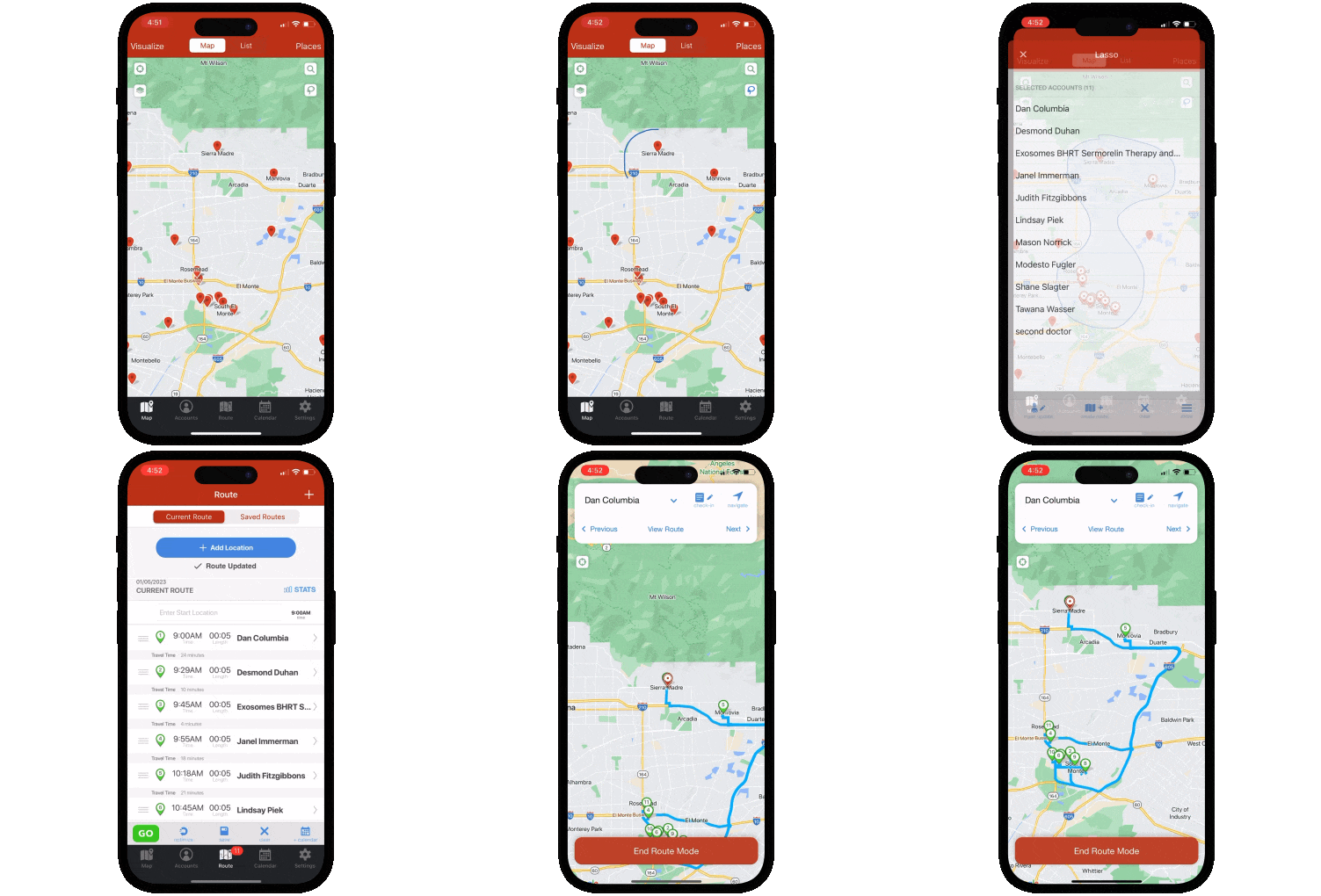
Badger Maps is the #1 field sales app for outside sales reps. It combines route optimization, CRM integration, territory visualization and alignment, and lead generation in a single mobile platform - so reps can plan smarter routes, see more customers, and spend less time on admin.
To illustrate what Badger Maps does in practice: A field rep can use Badger Maps to map every account in their territory, filter by last visit date and priority, build an optimized multi-stop route around their highest-value customers, discover new leads nearby with the Lead Generation feature, and sync every check-in automatically back to their CRM - all from their phone before leaving the driveway.
Teams using Badger Maps see an average 22% increase in sales, 20% less time spent driving, and 50% less time on admin tasks.
Why users like it: On the App Store and Google Play, users consistently praise the route optimization for saving meaningful time in the field, the reliability of the CRM sync for eliminating double data entry, and the responsiveness of the customer support team when issues arise.
Why users dislike it: Some users note they prefer the mobile app to the desktop experience. Pricing can feel steep for individual reps paying out of pocket rather than through a company plan - though most report the time savings make it pay for itself quickly.

Who Each Tool Is Built For
Both tools put data on a map, but that's roughly where the similarity ends. Mapline is a browser-based visualization and analytics layer for teams analyzing location data after the fact. Badger Maps is a mobile-first execution tool for reps who need to plan and run their day in the field, right now. And after that day in the field, Badger helps reps and managers analyze that data to maximum productivity.
Mapline is a strong fit if you:
- Work primarily from a desk analyzing location data - territory performance, competitor mapping, supply chain distance calculations
- Don't need a mobile app - Mapline's entire experience runs through a browser, which is fine for a browser-bound analyst but a real limitation for anyone who needs a high-functioning tool in hand between stops
- Want BI-style dashboards and reporting more than day-to-day route execution
Badger Maps is built for you if you:
- Visit multiple accounts per day across a geographic territory - Badger's route optimization is purpose-built for reps in the car all day, automatically sequencing stops to maximize meetings and minimize drive time
- Need a real mobile app, not just a mobile browser - Badger is built mobile-first for reps working in the field, with a native app that works reliably on the road
- Already use a CRM and need it to stay accurate without manual entry - Badger integrates natively with Salesforce, HubSpot, Microsoft Dynamics, Zoho, Netsuite, Pipedrive, and others, with two-way real-time sync that logs field activity automatically
- Need to find new leads while you're already in the field - Badger's Lead Generation feature surfaces nearby prospects on the map in real time, so reps can add a new account to today's route without switching tools
Badger Maps, the Highest Ranked App in the B2B Sales Mapping Apps Category
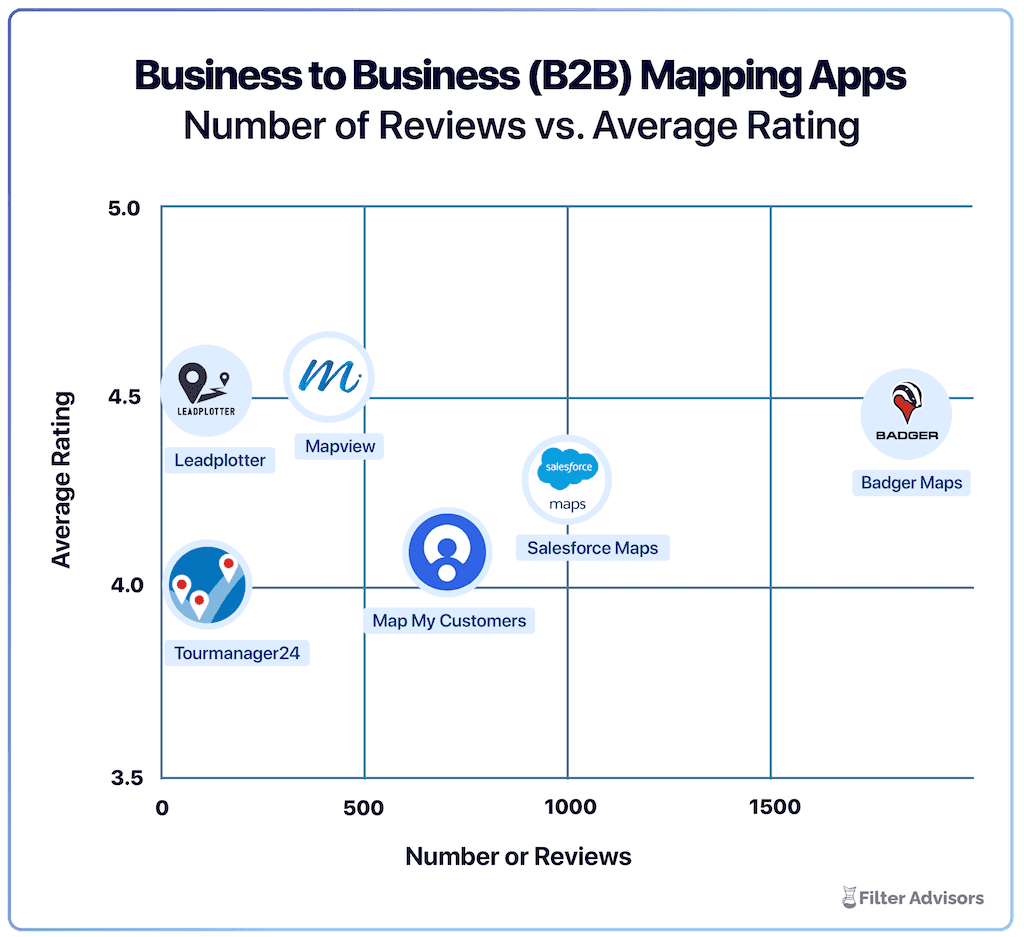
Badger is the highest ranked sales mapping and routing app, according to an industry wide analysis done by Filter Advisors, a technology consulting firm. Read more here.
Key Differences
1. No Mobile App at All
This is the clearest, most practical difference between the two tools.
Mapline doesn't have a native mobile app for iOS or Android. It's built to run in a browser, on desktop or mobile, which works fine for someone building a territory map at a desk but falls apart for a rep who needs the tool open, responsive, and usable one-handed between meetings. There's no app store presence to check because there's no app - Mapline isn't listed on the Apple App Store or Google Play at all.
Badger Maps is designed mobile-first, with a native app that scores 4.5 on the App Store. For a rep in the car six-plus hours a day, the difference between a purpose-built app and a browser tab isn't cosmetic - it's the difference between a tool that works in the field and one that doesn't.
2. Native CRM Integration
Integration is one of Badger Maps' strongest differentiators - and it's an area where Mapline doesn't compete at all.
Mapline has no native CRM integration. It's built to ingest spreadsheet data manually or via API for custom builds, which means keeping it in sync with your actual sales data is a manual process, not an automatic one.
Badger Maps integrates natively with Salesforce, HubSpot, Microsoft Dynamics, Zoho, Netsuite, Pipedrive, and others, with real-time two-way sync. Check-ins, notes, and account updates made in the field push straight to the CRM automatically - and changes made in the CRM show up in Badger without anyone re-importing a spreadsheet. For a sales team, that's the difference between a CRM that's actually current and one that's only as accurate as the last manual update.
3. Onboarding & Rep Adoption
A tool is only as good as how fast your team actually starts using it.
Badger Maps is built around a hands-on onboarding experience - a dedicated customer success team helps new teams get set up, connect their CRM, and build their first routes, so reps are up and running fast instead of left to self-teach. That focus on adoption shows up consistently across reviews: Badger has thousands of reviews on the App Store, Google Play, G2, and Capterra, with onboarding speed and friendly, responsive service among the most repeated praise. Users can reach a real human via phone, chat, or email.
Mapline, by comparison, has a very thin independent review footprint - Capterra shows a handful of reviews total, with no meaningful volume on the other major platforms. That makes it hard for a prospective buyer to know what onboarding or day-to-day support actually looks like, since so few teams have documented the experience publicly.
| How they compare | Badger Maps | Mapline |
|---|---|---|
| Built for field sales reps | ✓ Yes | △ Desk-first design |
| Mobile app | ✓ Full | ✗ Not available |
| Native CRM integration | ✓ Full | ✗ Not available |
| Route optimization (with live traffic) | ✓ Full | △ Partial |
| Lead generation (in-field) | ✓ Full | ✗ Not available |
| Published, self-serve pricing | ✓ Yes | ✗ Sales-only |
| 90-day money-back guarantee | ✓ Yes | ✗ No |
✓ Full △ Partial / limited ✗ Not available
Where Badger Maps Wins
For outside sales reps and their managers dealing with a geographic territory, Badger Maps is the stronger choice. The full workflow lives in one place: visualize your accounts on a map, build and optimize your route, check in after every meeting, generate leads nearby, and sync everything back to your CRM - reliably, from your phone, every day. The result is more meetings, less windshield time, and a CRM that stays current without anyone chasing reps for their activity data.
Where Mapline Might Be a Better Fit
If your priority is desk-based spreadsheet analysis - competitor mapping, supply chain distance calculations, etc. - rather than day-to-day field execution, Mapline's visualization tools may serve that narrower use case. It's worth noting, though, that this makes Mapline a business intelligence tool that happens to use maps, not a field sales tool in the way Badger Maps is.

“We downloaded the app and we were up and running with Badger the next day! Implementation was seamless and cost-effective”
Steve Crooks
Director of Business Development
Switching to Badger Maps Is Straightforward
If you're currently using Mapline and considering a switch, the transition is simpler than most teams expect.
- Free trial: no credit card required, connect your CRM and build your first route on day one
- Data import: upload your existing account list via spreadsheet or sync directly from your CRM
- Onboarding support: Badger's customer success team helps new teams get up and running quickly, and is reachable by phone when you need them
- No long-term commitment: month-to-month plans available so you can validate the tool before committing
- 90-day money-back guarantee: if Badger isn't delivering results for your team within 90 days, you get your money back.
Teams are fully operational within a day or two of signing up.
The Bottom Line
Mapline can be a reasonable spreadsheet-to-map visualization tool for an operations analyst working at a desk. But it has no mobile app, no native CRM integration, and a very thin independent review record - none of which bode well for a field sales team that needs a tool to work reliably, every day, from a phone.
If you need a field sales tool built for reps in the field, with native CRM integration and a team that gets your reps up and running fast - Badger Maps is built for exactly that.
Ready to see it in action? Start your free trial and build your first optimized route in minutes.
THE BEST APP FOR FIELD SALES PEOPLE
Learn how you can maximize your sales routes & sell more
What's the main difference between Mapline and Badger Maps?
Mapline is a browser-based spreadsheet-to-map visualization and analytics tool, with no native mobile app, built for teams analyzing location data from a desk. Badger Maps is a mobile-first field sales app built for reps who need to plan and run an optimized route every day, with native CRM integration and lead generation built in.
Does Badger Maps integrate with my CRM?
Yes - Badger Maps integrates natively with Salesforce, HubSpot, Microsoft Dynamics, Zoho, Netsuite, Pipedrive, and others. The sync is two-way and real-time - check-ins and notes logged in the field update your CRM automatically, and changes in your CRM appear in Badger without manual imports.
What does Mapline cost compared to Badger Maps?
Mapline doesn't publish self-serve pricing; you have to contact sales for a quote. Badger Maps publishes its pricing plainly at $58/user/month for business plans and $95/user/month for enterprise plans, with a 14-day free trial and 90-day money-back guarantee included.
Can I try Badger Maps before committing?
Yes - Badger Maps offers a 14-day free trial with no credit card required. You can connect your CRM, import your accounts, and run optimized routes before making any purchasing decision. A 90-day money-back guarantee is also available after purchase.
The names and logos for Badger Maps are trademarks of Badger Maps, Inc. All other trademarks, brand names, or product names belong to their respective holders. The purpose of this comparison is to provide customers with truthful information about competitors with no affiliation or partnership in place. This comparison is based on information gathered from the company's website and other 3rd party websites on the date written, and thus changes may have occurred.


