Review & Compare: Mapsly vs Badger Maps
Which Field Sales Tool Is Right For You?
If you're evaluating Badger Maps against Mapsly, you're likely a field sales rep or sales manager who's noticed they look similar on paper: both map your CRM data, both optimize routes, and both help B2B field sales.
Dig into the user reviews, though, and a clear picture emerges. Mapsly is built for ops teams configuring workflows at a desk. Badger is built for the whole field sales organization: the reps on the road all day, the teams they work with, and the managers who lead them.
The bottom line: if your business runs on field sales, from reps building routes to managers tracking team results, Badger Maps is the better fit. If a sales ops team will configure and run the tool mostly from a desk, Mapsly may be what you're looking for. The rest of this guide shows why.
Start your free trial Watch a demo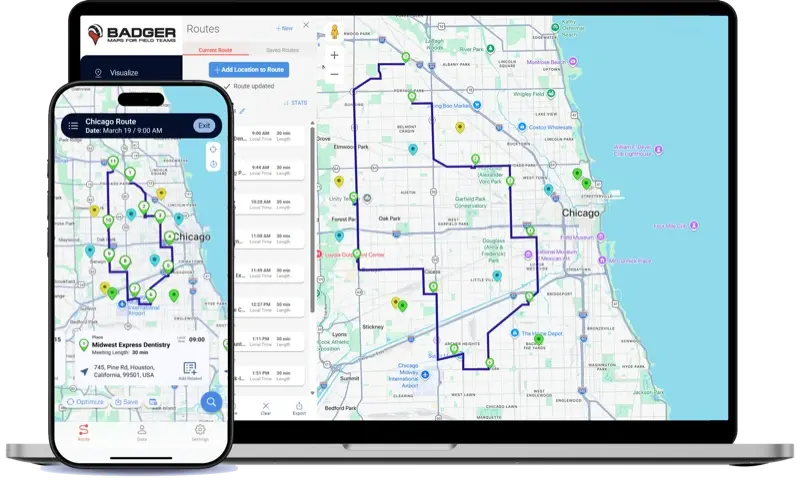
On this page
Mapsly vs. Badger Maps: App Store ratings
These ratings come from the people using the Badger Maps and Mapsly app on their phones every day.
Badger Maps
1,100+ ratings
Badger Maps: US App Store, October 2026. Mapsly: US App Store as archived on March 9, 2026. Mapsly has since reset its overall rating, which developers can do anytime they release a new version.1
What is Mapsly? What is Badger Maps?
Badger Maps
Badger Maps is the #1 B2B field sales platform. It combines route optimization, CRM integration, territory visualization and lead generation in a single mobile platform, so outside sales teams plan smarter routes, see more customers, and spend less time on admin.
A team of pharmaceutical reps map every hospital and clinic in their territory, filter by last visit date and priority, build optimized multi-stop routes around their highest-value accounts, find new leads nearby with Lead Generation, and sync every check-in back to Salesforce, all from their phone before leaving the parking lot.
Mapsly
Mapsly is a geo-intelligence and field sales platform for outside sales teams and the sales operations managers who support them. It positions itself as an all-in-one geolocation platform and is commonly used in industries like medical devices, logistics and business services.
A sales ops manager at a wholesale distributor builds territory maps from postal codes, assigns incoming leads to reps by location, runs multi-user route optimization, and pulls analytics dashboards from CRM and field data.
Badger Maps vs. Mapsly at a glance
| Feature | Badger Maps | Mapsly |
|---|---|---|
| CRM and data | ||
| Two-way CRM sync | ✓ Business plan and up | △ Pro plan and up3 |
| Free CRM integration setup | ✓ Yes | ✓ Yes |
| In the field | ||
| Route optimization with live traffic | ✓ Yes | ✓ Yes |
| Find new leads on the map | ✓ Yes | △ Pro plan and up3 |
| IRS-compliant mileage reports | ✓ Every plan | ✗ Not listed3 |
| Management | ||
| Manager dashboards and activity reports | ✓ Included | △ Paid add-on3 |
| Support and billing | ||
| Phone, chat and email support | ✓ Every plan | △ Chat; web calls on Pro3 |
| Predictable billing, no usage fees | ✓ Yes | ✗ Usage fees above plan limits4 |
✓ Included △ Higher tier or limited ✗ Not available or not listed. Badger details from our pricing page.2
Key differences: features and reviews
Mobile app reliability
Badger is built mobile-first for reps who spend hours each day in the car.
It stays stable while you navigate between accounts, and route context persists so you don't lose your place mid-day.
Mapsly's mobile reviews describe slow map loading, frequent crashes, lag when zooming or switching accounts, and an iOS update that broke the app for a period. Its G2 and Capterra scores, written largely by managers and ops teams at a desk, are considerably higher. It works for the people configuring it, and struggles for the people using it on the road.
"Great idea, poorly made. Looks like developers never used their app in the field."
Mapsly user, App Store review"The mobile version is not user friendly and very difficult to use."
Mapsly user, G2 review"It has challenges with large amounts of data quickly on mobile."
Mapsly user, Zoho Marketplace ReviewSetup and time to value
Most Badger teams connect their CRM and build their first optimized route the day they sign up.
There's no implementation team and no mandatory onboarding call to unlock basic features, though reviewers say Badger's onboarding team is effective. For a sales manager who needs the team productive this week, not next quarter, that gap matters.
Mapsly's depth is real, with 90+ geo-features, no-code automation, embeddable maps and multi-user routing. Reviewers say that depth comes with a steep learning curve before reps are productive.
"The initial setup can be a bit challenging, there's a learning curve and it takes some time to get fully accustomed."
Mapsly user, G2 Review"Some users find the initial setup and feature navigation complex. It takes time to understand all the capabilities, especially for automation and custom workflows."
Mapsly user, G2 Review"It's very slow at times and doesn't sync or communicate with my CRM Hubspot."
Mapsly user, G2 ReviewReal human support: phone, chat or email
Every Badger plan includes phone, chat and email support, so a rep can reach a real person mid-route.
Mapsly reviewers describe freezes, failed loads, delayed syncing, and stops that show up in the wrong place. Those are the kinds of issues that stall a rep in the field until they're fixed. Mapsly's support runs through chat on every plan, with web calls added on Pro, and no phone line.
Badger Business and Enterprise teams also get 1:1 and team training, so reps know the app before they hit the road.
"Quite buggy sometimes when trying to load accounts/routes on phone. Have had a number of bugs when it just froze and lagged multiple times."
Mapsly user, G2 Review"It often fails to load. It also sometimes says I'm nowhere near a place I am literally standing right in front of."
Mapsly user, G2 Review"A job will load in the completely wrong place and you have to spend ages playing around with it to load in the correct location."
Mapsly user, G2 ReviewBadger Maps, the Highest Ranked App in the B2B Sales Mapping Apps Category
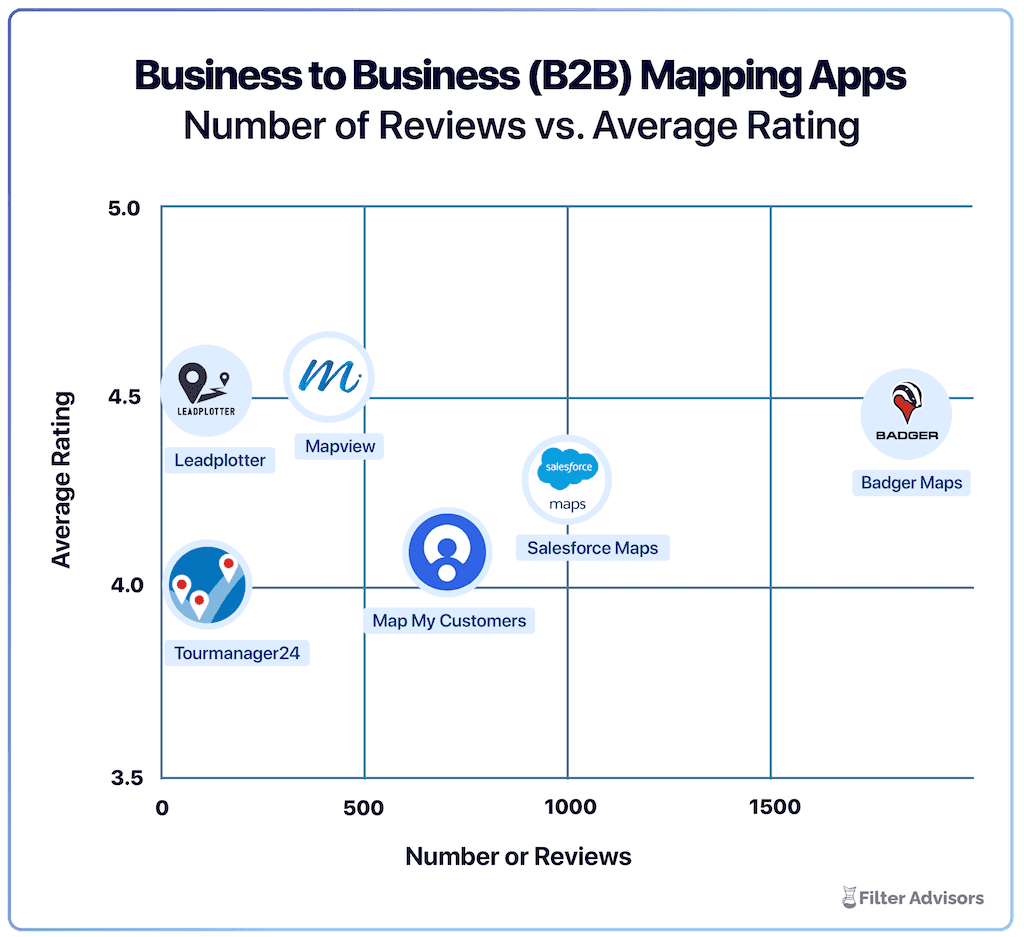
Badger is the highest ranked sales mapping and routing app, according to an industry wide analysis done by Filter Advisors, a technology consulting firm. Read more here.
Badger Maps vs. Mapsly pricing
Mapsly Pro is its first plan with two-way CRM sync and prospecting, so it's the fair match for Badger Business.
Badger Maps Business
✓Two-way CRM sync and lead generation
✓Manager dashboards and IRS-compliant mileage reports
✓Phone, chat and email support, plus 1:1 and team training
✓No setup, integration or usage fees
Enterprise: $95 per user / month, billed annually ($109 monthly). Adds multi-object CRM sync, SSO and a dedicated account manager.
Mapsly Pro
✓Two-way CRM sync and prospecting
✓10,000 records included, then $13 / month per 10,000
✓Dashboards as an add-on: $39 per editor, $13 per viewer / month
✓24/7 chat and web-call support
What a 25-rep team pays per year
| Line item | Badger Business | Mapsly Pro |
|---|---|---|
| 25 seats, billed annually | $17,400 | $16,500 |
| 50,000 CRM records | Included | $624 |
| Manager dashboards (1 editor, 2 viewers) | Included | $780 |
| Total per year | $17,400 | $17,904 |
List prices as of October 5, 2026, before taxes and discounts.25 See the FAQ for how we built this comparison.
Is Badger Maps or Mapsly right for your team?
Both tools target B2B field sales, but they're optimized for very different users. Mapsly skews toward sales ops teams that need deep customization and complex multi-user workflows. Badger Maps skews toward the front-line sales teams and sales manager who need to be productive in the field today, without a long setup process.
✓Visit multiple accounts a day across a territory
Route optimization built for teams of reps in the car all day, sequencing stops automatically to maximize meetings and minimize drive time.
✓Have a sales ops team to own configuration
Mapsly's depth takes real implementation time, and reviewers say you'll need an onboarding call just to get started.
✓Need your tool to work reliably on your phone
Badger scores a 4.5 on the App Store. Before Mapsly reset its rating in 2026, it sat at 2.7.
✓Work primarily from a desktop
Mapsly's web app gets much stronger reviews than its mobile app, so it suits ops managers configuring workflows more than reps on the road.
✓Need your CRM accurate without manual entry
Native two-way, real-time sync with Salesforce, HubSpot, Microsoft Dynamics, Zoho, NetSuite, Pipedrive and others, logging field activity automatically.
✓ Dispatch jobs across multiple reps
Mapsly can split a day's stops across the team, which suits field service teams where any rep can take any job.
✓Want to find new leads while you're in the field
Lead Generation surfaces nearby prospects on the map, so reps can add a new account to today's route without switching tools.
Where Badger Maps wins
For outside sales reps managing a geographic territory, Badger Maps is the stronger choice. The full workflow lives in one place: visualize your accounts on a map, build and optimize your route, check in after every meeting, generate leads nearby, and sync everything back to your CRM, reliably, from your phone, every day.
The result is more meetings, less windshield time, and a CRM that stays current without anyone chasing reps for their activity data.
"One out of every five sales is a direct result of the information Badger gives our team."
Switching from Mapsly to Badger Maps
The transition is simpler than most teams expect. Most are fully running within a day or two of signing up.
Start a free trial
14 days, with your first route built on day one.
Bring your data
Sync from your CRM or upload a spreadsheet. We set up the integration for free.
Train your team
Our success team trains your reps and is reachable by phone when you need them.
Validate it
Month-to-month plans with no lock-in, plus a 90-day money-back guarantee.
The bottom line
Mapsly suits sales ops teams willing to invest the time to configure it. If your sales team needs a tool that works on their phone from day one, integrates seamlessly with the CRM you already use, and comes with support you can call, Badger Maps is built for exactly that.
Mapsly vs. Badger Maps: frequently asked questions
What's the main difference between Mapsly and Badger Maps?
Mapsly is a geo-intelligence platform built for sales ops teams who need deep customization, mostly configured and used from a desktop. Badger Maps is built for the whole field sales organization. Reps get route optimization, lead generation and two-way CRM sync that work on their phone from day one. Their teams stay coordinated on one shared view of accounts and activity. Managers get dashboards and automated activity reports that show what's happening in the field, and Enterprise adds SSO and multi-object CRM sync for larger organizations.
Why do teams switch from Mapsly to Badger Maps?
Mobile reliability and time to value. Before Mapsly reset its App Store rating in 2026, it sat at 2.7, and reviewers describe an app that struggles on the phone, and a steep learning curve before reps are productive. Teams using Badger are usually routing on day one.
Is Badger Maps or Mapsly better for sales managers?
Mapsly offers strong manager-facing features such as multi-user routing, territory dashboards and location tracking, though they take configuration to unlock, and its analytics dashboards are a paid add-on. Badger Business includes management dashboards and automated activity reports that show what reps actually did in the field, without a technical setup process or implementation team. The right choice depends on whether your priority is ops-configured oversight or rep-level field productivity.
How did you calculate the 25-rep cost comparison?
We used each company's published list prices as of October 5, 2026, billed annually: Badger Business at $58 per user per month and Mapsly Pro at $55. We assumed 50,000 CRM records (Mapsly includes 10,000 and charges $13 a month for each additional 10,000) and manager dashboards for one editor and two viewers (a $39 and $13 per-user add-on on Mapsly, included on Badger Business). Your numbers will vary with team size and needs.
Do Badger Maps and Mapsly include territory management?
Mapsly Pro includes drawing and auto-assigning up to 100 territories. Badger offers territory design as a separate product, Badger Align, at $20 per territory per month billed annually, with a five-territory minimum. Badger Enterprise Plus bundles territory tools with the full platform.
What does Badger Maps cost compared to Mapsly?
Badger Business is $58 per user per month billed annually ($69 monthly), and Enterprise is $95 ($109 monthly), with no setup or usage fees. Mapsly Pro is $55 per user per month billed annually, with extra records and dashboards billed separately. For a 25-rep team, the two land within about $500 a year of each other at list price.
Does Badger Maps integrate with my CRM?
Yes. Badger integrates natively with Salesforce, HubSpot, Microsoft Dynamics, Zoho, NetSuite, Pipedrive, monday.com, Insightly, SugarCRM, Veeva, Odoo and more, and we set it up for free. The sync is two-way and real-time: check-ins and notes logged in the field update your CRM automatically, and changes in your CRM appear in Badger without manual imports.
How long does it take to get started with Badger Maps?
Most sales teams connect their CRM, upload their accounts, and build their first optimized route the same day they sign up. There's no implementation team required and no onboarding call needed to unlock basic features, and our support team is reachable by phone if you need help.
Can I try Badger Maps before committing?
Yes. Individuals get a 14-day free trial, and teams can run a free 14-day pilot integrated with their CRM. You can connect your CRM, import your accounts, and run optimized routes before making any purchasing decision, and when you sign up on our website you won't need a credit card for the first 7 days. After purchase, teams of two or more licenses are covered by a 90-day money-back guarantee.
Sources and notes
- US App Store listings for Badger Maps and Mapsly. Mapsly's 2.7 rating is from the Internet Archive snapshot of March 9, 2026, before the rating was reset.
- Badger Maps pricing and plan comparison.
- Mapsly pricing and plan comparison. Mileage reports do not appear in Mapsly's plan feature list.
- Mapsly Help Center, subscription plans and usage-based fees.
- Mapsly list prices as published on Mapsly pricing page.
The names and logos for Badger Maps are trademarks of Badger Maps, Inc. All other trademarks, brand names, or product names belong to their respective holders. The purpose of this comparison is to provide customers with truthful information about competitors with no affiliation or partnership in place. This comparison is based on information gathered from the company's website and other 3rd party websites on the date written, and thus changes may have occurred.


