How to Install Badger Maps from the HubSpot Marketplace
Connecting Badger Maps to HubSpot is quick and easy. Just install Badger Maps from the HubSpot Marketplace and you can set everything up yourself. If you need help customizing the integration to fit your needs, though, feel free to reach out to us. Here’s how to get started.
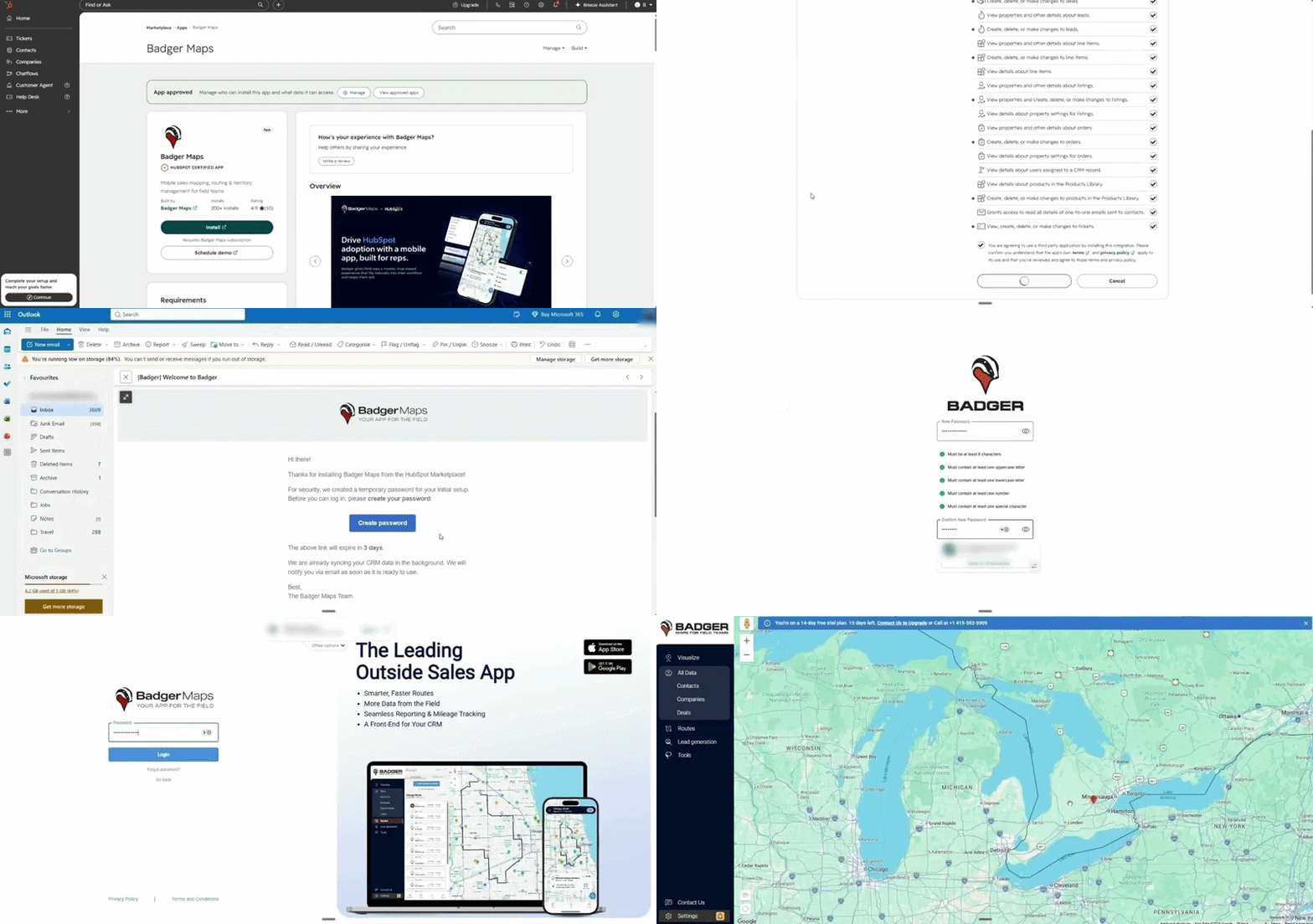
1. Open up HubSpot’s marketplace, search for Badger Maps, and click the Install button.
2. Select the HubSpot account you want to connect to Badger Maps, then click Choose Account.
3. Once done, click the Connect app button. You’ll see the Badger Maps logo while the installation processes, then you’ll be redirected to your HubSpot dashboard.
4. Check your email to set your Badger password after the installation is done. Note that the link in the email to set your new password will expire in 3 days. You will use this password when logging in to your Badger account.
5. You will then get another email when the integration and sync with Badger has completed.
6. You can now log in to Badger Maps account at https://go.badgermapping.com/, and see your HubSpot data.