News: Now offering a 90-day money-back guarantee!
Learn more
News: Now offering a 90-day money-back guarantee!
Learn moreBoth Badger Maps and RepMove are built for B2B outside sales reps - and both are worth taking seriously. But there's a meaningful difference between a tool designed for individual reps and small teams finding their footing, and a platform that's been battle-tested across enterprise deployments of 1,000+ seats for over a decade.
This guide breaks down the real differences so you can make the right call for you and your team. Let's dive in!
RepMove is a field sales platform built for outside sales reps and the managers who lead them. Founded in 2020, RepMove positions itself as a tool made by salespeople for salespeople. It combines a mobile field sales app with a web-based CRM, route optimization, territory management, team communication, and a sales pipeline tool. RepMove is commonly used by small to mid-sized teams in industries like medical devices, equipment rental, distribution, and insurance.
To illustrate what RepMove does in practice:
A territory account manager at an equipment rental company can use RepMove to plan the day's route, log visit notes via talk-to-text, scan a business card to create a new prospect, tag teammates to process an order, and review the team's activity dashboard at the end of the day - all without leaving the app.
Why users like it:
RepMove has earned strong ratings on G2 and Capterra, and users consistently praise the clean mobile interface, the ease of logging notes and activities in the field, the business card scanner, the talk-to-text functionality, and an onboarding experience they describe as smooth and accessible. For individual reps and smaller teams, reviewers describe it as a tool that genuinely gets out of the way and lets them sell.
Why users dislike it:
The most consistent criticism is a learning curve and getting familiar with the full feature set - particularly around task management and navigating between notes, accounts, and follow-ups. Some users report occasional app slowdowns or freezing, typically in areas with limited cell service. A handful of reviewers note that the app experience, while functional, still trails the desktop web interface in some areas.
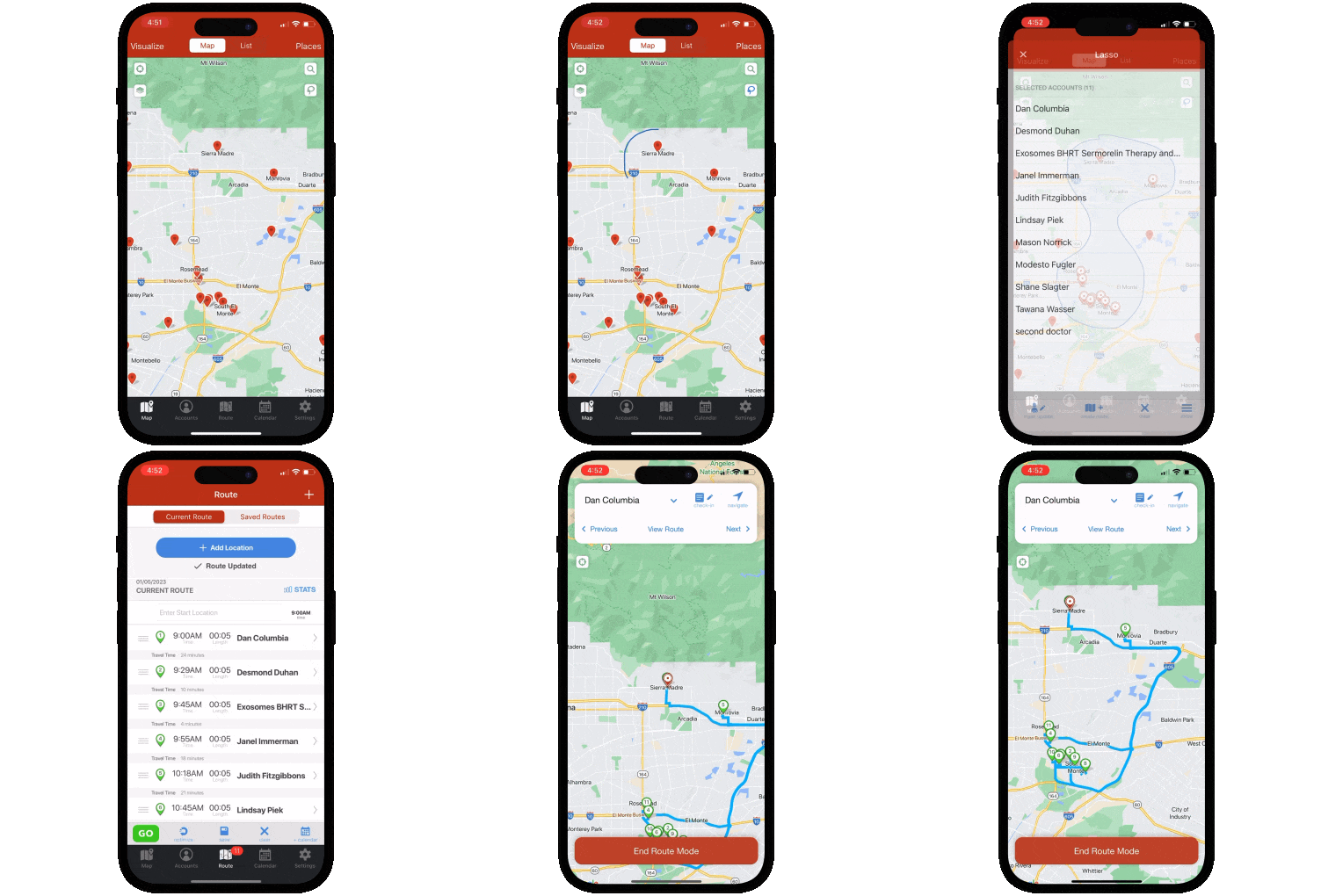
Badger Maps is the #1 field sales app for outside sales reps. It combines route optimization, CRM integration, lead generation, territory visualization, and reporting in a single mobile platform - so reps can plan smarter routes, see more customers, and spend less time on admin.
To illustrate what Badger Maps does in practice:
A pharmaceutical rep can use Badger Maps to map every hospital and clinic in their territory, filter by last visit date and priority, build an optimized multi-stop route around their highest-value accounts, discover new leads nearby with the Lead Generation feature, and sync every check-in automatically back to Salesforce - all from their phone before leaving the parking lot.
Teams using Badger Maps see an average 22% increase in sales, 20% less time spent driving, and 50% less time on admin tasks.
Why users like it:
On the App Store and Google Play (where it scores a 4.5 and 4.0, respectively), users consistently praise the route optimization for saving meaningful time in the field, the reliability of the CRM sync for eliminating double data entry, and the responsiveness of the customer support team when issues arise.
Why users dislike it:
Some users note that the mobile app can feel less polished than the desktop experience. Pricing can feel steep for individual reps paying out of pocket rather than through a company plan - though many report the time savings make it pay for itself quickly.
Both tools target B2B outside sales, and both do it genuinely well for different segments of that market. RepMove was built for individual reps and smaller teams who want a clean, accessible field sales tool without a heavy implementation process. Badger Maps is built for the full range - from individual reps to enterprise deployments of 1,000+ seats - with a depth of features and a track record that scales accordingly.
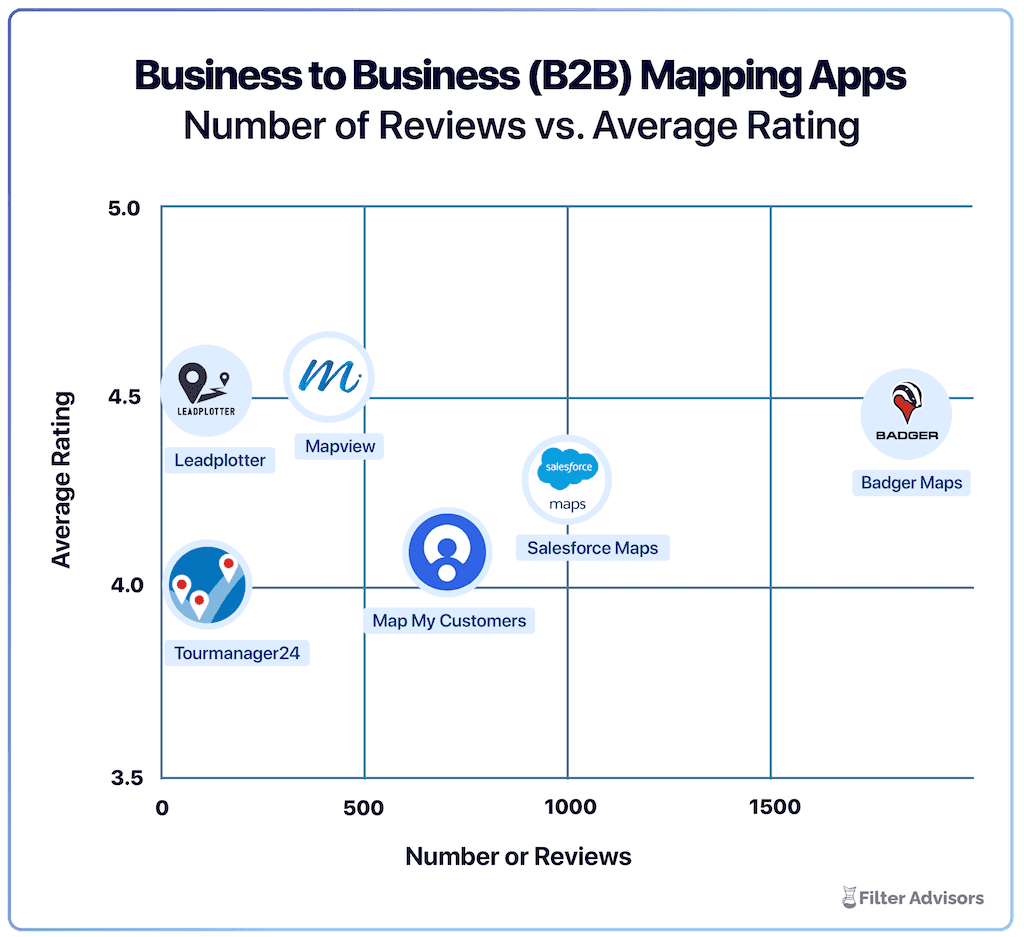
Badger is the highest ranked sales mapping and routing app, according to an industry wide analysis done by Filter Advisors, a technology consulting firm. Read more here.
This is the foundational difference between the two tools - and it matters more than any individual feature comparison.
Badger Maps has been purpose-built for field sales since 2012. RepMove launched in 2020. That's not a criticism of RepMove - their product is well-designed and their growth has been solid. But over a decade of iteration, enterprise deployments, and customer feedback produces a depth of reliability and capability that a few years simply can't replicate.
The evidence is concrete: Badger Maps powers field sales teams from individual reps to organizations like Danaher, where adoption drove a 50% increase in CRM usage across a 1,000+ seat deployment. RepMove's own positioning tells a different story - their Flex plan is explicitly built for individual users, their Sales Pro plan caps at 10 users, and their Accelerate plan for 11+ users is where enterprise features begin to appear. There's nothing wrong with that positioning - it's honest about who they're built for. But if your team is growing, or already large, the question of which platform is built to scale with you has a clear answer in Badger Maps.
Both tools track field activity. The difference is what they do with it.
RepMove's manager dashboard surfaces rep activity in real time - visits logged, notes added, routes completed. That's genuinely useful for managers who want to see what's happening in the field without chasing their team for updates. It answers the question: "What did my reps do today?"
Badger Maps goes a level deeper. Reporting and analytics in Badger are designed to answer a different set of questions: which accounts haven't been visited in 30 days? Where are the gaps in territory coverage? Which reps are spending time on low-priority accounts? How does field activity connect to revenue outcomes? The difference is between a tool that records what happened and a tool that tells you what to do next. For a sales manager trying to coach a team, allocate resources, and optimize territory performance, that distinction is significant.
This is the capability that drove Danaher's results - not just that reps were logging activity, but that managers could see patterns across the territory and act on them.
RepMove includes territory management as a feature: accounts can be assigned to reps based on geographic rules, and territories are visible on the map. For smaller teams with straightforward territories, that's often enough.
Badger Maps approaches territory differently. Badger Align is a dedicated territory planning product - not just an assignment feature - with scenario modeling that lets managers design and compare different territory structures before committing, workload balancing across reps, and visual territory design tools built for the kind of annual planning and mid-year adjustments that growing sales organizations actually need. For a sales operations team managing a territory review or a team restructure, the difference between assignment rules and full territory intelligence is meaningful.
RepMove's business card scanner is a genuinely clever feature. Meeting someone at a trade show or a drop-in visit, snap their card and instantly create a new prospect. Many field reps would find use for it.
Badger Maps' Lead Generation feature operates differently. While you're already driving between accounts, the feature surfaces nearby businesses on the map - filter by category, review basic details, add a promising prospect to today's route, and log the visit after. No separate prospecting session required, no switching apps. The difference is timing: RepMove's scanner captures contacts you've already met. Badger's lead generation finds prospects you didn't know existed, while you're already in the area to visit them. For a rep whose job includes both maintaining existing accounts and growing the territory, that proactive capability compounds over time.
RepMove's pricing looks straightforward at first glance: Flex at $16.67/user/month (annually), Sales Pro at $54/user/month, Accelerate at $80/user/month. But there's a meaningful detail in the plan structure that's worth understanding before you commit.
Two-way CRM integration - the kind where changes in your CRM appear in RepMove and field activity syncs back automatically - is only available on the Accelerate plan, which starts at $80/user/month and requires 11+ users. The Sales Pro plan, designed for teams up to 10 users, only includes one-way integrations. That means for most of RepMove's target market - smaller teams - the CRM sync is one-directional, which means manual reconciliation on the other end.
Badger Maps starts at $58/user/month for business plans with native two-way, real-time integrations included across all plans - no plan upgrade required to get full sync. When you factor in the integration reality of RepMove's mid-tier plan, the pricing gap between the two tools narrows considerably for teams that need their CRM to actually stay current. It's also worth noting that Badger Maps offers a 90-day money-back guarantee.
| How they compare | Badger Maps | RepMove |
|---|---|---|
| Route optimization w/ live traffic | ✓ Full | △ Partial |
| Native two-way CRM sync | ✓ Full | △ 'Accelerate' plan only |
| In-field lead discovery | ✓ Full | ✗ No |
| Automated territory planning | ✓ Full | ✗ No |
| Reporting & actionable insights | ✓ Full | △ Partial |
| Enterprise scalability (1,000+ seats) | ✓ Full | △ SMB-focused |
| AI / automation platform-wide | ✓ Full | △ Partial |
| 90-day money-back guarantee | ✓ Yes | ✗ No |
✓ Full △ Partial / limited ✗ Not available
For field sales teams that need to scale, turn field activity into territory intelligence, and keep CRM data accurate without manual effort, Badger Maps is the stronger choice. Thirteen years of iteration, enterprise-grade reliability, proactive in-field lead generation, full territory planning with Badger Align, and native two-way CRM sync on every plan - it's a platform built to grow with your team, not one your team will outgrow.
RepMove is genuinely worth considering if you're an individual rep or a small team under 10 users looking for an affordable, easy-to-deploy field sales tool. The mobile experience is well-designed, and for teams that don't need enterprise-grade territory intelligence or complex CRM integration, RepMove delivers value at an accessible price point. If you're just getting started with field sales software and want something your team can be productive with from day one without heavy overhead, RepMove may be a legitimate option. That's what free trials are for!
“Knowing our most valuable accounts, and the best way to get to them, saves us a ton of time driving. Badger’s route optimization cuts our drive time by 25%”
John O’Kain
Territory Manager, NCR Aloha
If you're currently using RepMove and considering a switch, the transition is simpler than most teams expect.
Teams are fully operational within a day or two of signing up.
RepMove is a well-designed field sales tool with a genuine origin story and a strong mobile experience - particularly for individual reps and smaller teams who want accessible, affordable field sales software without heavy implementation overhead. If that's your situation, it deserves a serious look.
But if your team is growing, if you need field data to drive territory decisions rather than just log activity, if you need true two-way CRM sync without upgrading to the top pricing tier, or if you need a platform with the enterprise track record to support a deployment of any size - Badger Maps is built for exactly that.
Ready to see it in action? Start your free trial and build your first optimized route in minutes.
Learn how you can maximize your sales routes & sell more with Badger Maps.
What's the main difference between RepMove and Badger Maps?
Both are built for B2B outside sales, but they're optimized for different scales and use cases. RepMove is a clean, accessible field sales tool built for individual reps and smaller teams - it's affordable, easy to deploy, and genuinely well-designed for the core field sales workflow. Badger Maps is built for the full range - individual reps through 1,000+ seat enterprise deployments - with deeper territory intelligence, proactive in-field lead generation, and native two-way CRM sync on every plan.
Does RepMove have two-way CRM integration?
Two-way integration is only available on RepMove's Accelerate plan, which starts at $80/user/month and requires 11 or more users. Their Sales Pro plan - designed for teams up to 10 users - only includes one-way integrations, meaning field activity doesn't automatically sync back to your CRM without manual reconciliation. Badger Maps includes native two-way, real-time CRM sync on all plans.
Does Badger Maps integrate with my CRM?
Yes - Badger Maps integrates natively with Salesforce, HubSpot, Microsoft Dynamics, Zoho, Netsuite, Pipedrive, and others. The sync is two-way and real-time on all plans - check-ins and notes logged in the field update your CRM automatically, and changes in your CRM appear in Badger without manual imports.
Is Badger Maps or RepMove better for enterprise teams?
Badger Maps is significantly better suited for enterprise deployments. It has powered teams of 1,000+ seats - including organizations like Danaher where adoption drove a 50% increase in CRM usage. RepMove's pricing structure is explicitly designed around individual users and teams under 10 (Sales Pro) or 11+ (Accelerate), and its enterprise feature depth reflects that positioning.
How does Badger Maps handle territory management compared to RepMove?
RepMove includes territory assignment rules - accounts can be assigned to reps based on geographic criteria, and territories are visible on the map. Badger Maps goes further with Badger Align, a dedicated territory planning product that includes scenario modeling, workload balancing, and visual territory design tools built for annual planning and team restructuring. For sales operations teams managing complex, multi-rep territory alignments, the difference is meaningful.
What does Badger Maps cost compared to RepMove?
RepMove's Sales Pro plan runs $54/user/month (annually) for up to 10 users with one-way integrations, and $80/user/month for the Accelerate plan with two-way integrations and 11+ users. Badger Maps starts at $58/user/month for business plans and $95/user/month for enterprise plans, with native two-way CRM sync included on all plans and a 14-day free trial with no credit card required.
Can I try Badger Maps before committing?
Yes - Badger Maps offers a 14-day free trial with no credit card required. You can connect your CRM, import your accounts, and run optimized routes before making any purchasing decision. A 90-day money-back guarantee is also available after purchase.
The names and logos for Badger Maps are trademarks of Badger Maps, Inc. All other trademarks, brand names, or product names belong to their respective holders. The purpose of this comparison is to provide customers with truthful information about competitors with no affiliation or partnership in place. This comparison is based on information gathered from the company's website and other 3rd party websites on the date written, and thus changes may have occurred.
Looking for our logo?
Grab a Zip packed with our logo in PNG and EPS formats.